Twitter API Access Revoked? Here's What to Do
You’re running a script, managing automation workflows, or pulling data from Twitter—and suddenly everything stops. Requests fail, endpoints return errors, and your application loses access. The message is clear but frustrating: your Twitter API access has been revoked.
This isn’t just a technical hiccup. If your workflows depend on the API, this can disrupt data pipelines, break automation systems, and halt entire operations. For developers, marketers, and agencies, it can mean lost time, missed opportunities, and unstable systems.
What makes this situation worse is that revocations often feel sudden. You might not have received a clear warning, and the exact cause isn’t always obvious. However, Twitter rarely revokes API access without a reason. In most cases, it’s triggered by policy violations, unusual usage patterns, or changes in platform rules.
The good news is that API access can often be restored—or at least worked around—if you understand what caused the issue and take the right corrective steps. More importantly, you can redesign your workflows to prevent it from happening again.
In this guide, you’ll learn why Twitter revokes API access, how to diagnose the issue, the exact steps to recover, and how to build safer systems moving forward, including when it makes sense to shift away from API-heavy approaches toward browser-based automation using platforms like Appilot.
What “API Access Revoked” Actually Means
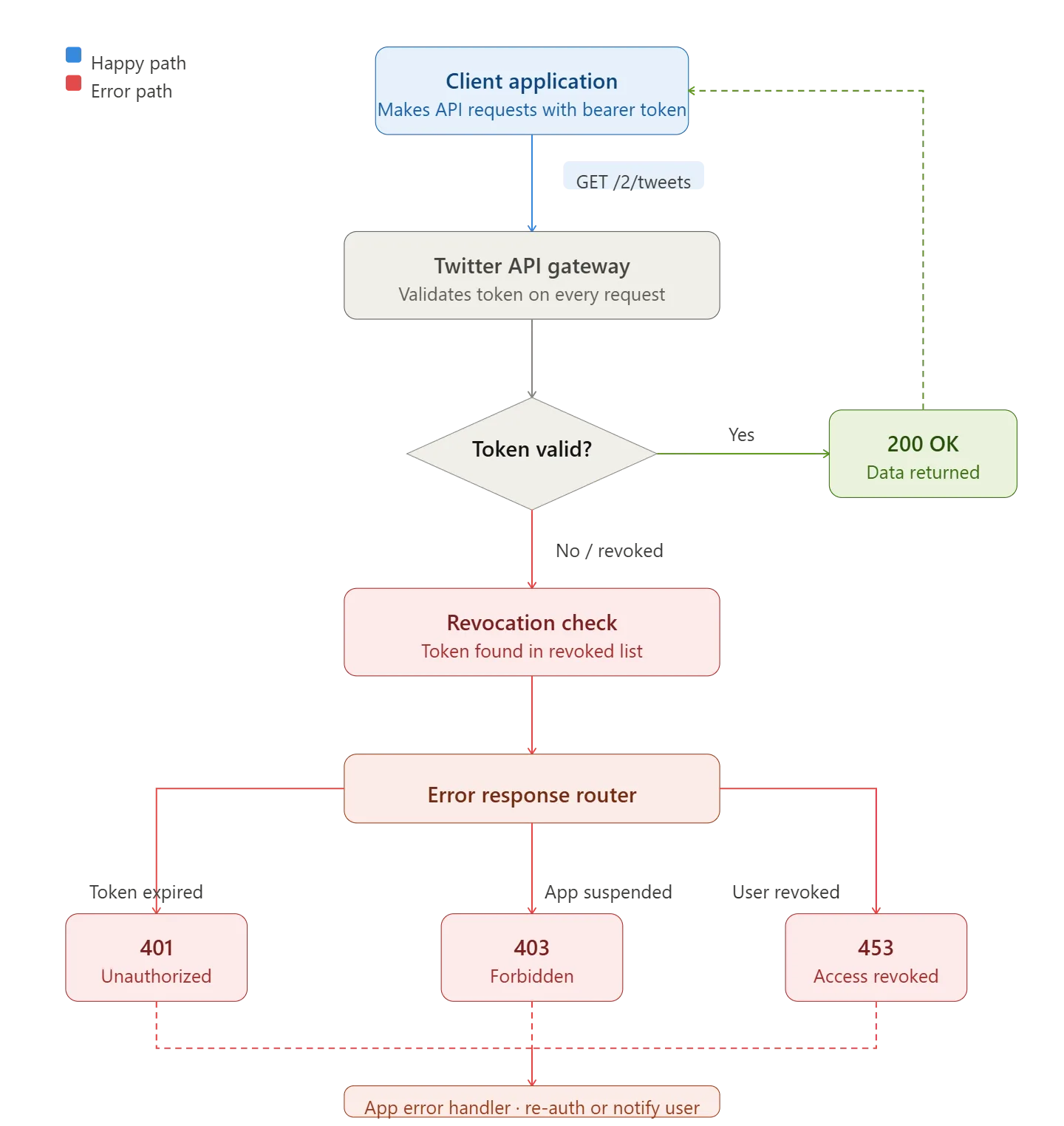
When Twitter revokes your API access, it means your developer credentials—API keys, tokens, or app permissions—are no longer authorized to interact with Twitter’s servers. Any request made through those credentials will fail.
This can happen at different levels. Sometimes a specific endpoint is restricted. In other cases, your entire developer app is disabled. In more severe situations, your developer account itself may be suspended.
Unlike temporary rate limits, which reset automatically, API revocation requires action. Your access won’t return unless you resolve the underlying issue and regain approval.
Why Twitter Revokes API Access
Twitter enforces strict rules around how its API can be used. These rules are designed to prevent abuse, protect user data, and maintain platform integrity.
One common reason for revocation is policy violations. This includes scraping data in ways that violate terms, storing user data improperly, or using the API for spammy or manipulative actions.
Another major factor is unusual usage patterns. Sudden spikes in requests, high-frequency automation, or repetitive actions can trigger flags. Even if your intentions are legitimate, the system may interpret your behavior as risky.
Changes in Twitter’s policies can also affect access. In recent years, the platform has tightened restrictions around API usage, limiting free access and enforcing stricter compliance requirements.
Finally, account-level issues can play a role. If the Twitter account linked to your developer app faces restrictions, it can indirectly impact API access.
Common Scenarios That Trigger Revocation
High-Volume Automation
Running scripts that post, like, or follow at high speed can trigger enforcement mechanisms. Even if the API allows certain limits, consistent high-volume activity may still raise concerns.
Data Scraping Violations
Using the API to collect large amounts of user data without clear compliance can lead to revocation. This includes storing or redistributing data in ways that violate Twitter’s policies.
Misuse of Endpoints
Certain endpoints have specific use cases. Using them in unintended ways, such as bulk messaging or aggressive engagement, can result in access being removed.
Incomplete Developer Compliance
Failing to provide required information about your app, its use case, or data handling practices can also lead to revocation. Twitter expects transparency from developers.
Account Trust Issues
If your account has previous violations, warnings, or suspicious activity, it increases the likelihood of API restrictions.
How to Diagnose the Problem
The first step is to identify exactly what was revoked. Check error messages from your API responses. They often indicate whether the issue is related to authentication, permissions, or policy enforcement.
Next, review your developer dashboard. Look for notifications, warnings, or changes in app status. Twitter sometimes provides clues about what triggered the action.
Analyze your recent activity. Consider whether you increased request volume, changed workflows, or introduced new scripts. Sudden changes are often the cause.
Finally, review Twitter’s developer policies to identify any potential violations. Even unintentional non-compliance can result in access being removed.
Steps to Recover API Access
The recovery process depends on the severity of the issue, but there are several key steps you should follow.
First, stop all API activity immediately. Continuing to send requests after revocation can worsen the situation.
Next, review and fix any violations. This may involve reducing request volume, removing problematic features, or updating how you handle data.
After that, submit an appeal through Twitter’s developer support channels. Clearly explain your use case, acknowledge any mistakes, and outline the changes you’ve made to comply with policies.
Be patient. Response times can vary, and approval is not guaranteed. However, clear communication and demonstrated compliance improve your chances.
When to Consider Alternatives to the API
In some cases, restoring API access may not be feasible or practical. This is especially true if your workflows rely heavily on actions that Twitter restricts through its API.
This is where browser-based automation becomes a viable alternative. Instead of interacting with Twitter through its API, you automate actions directly through the web interface.
Platforms like Appilot allow you to run automation workflows in a controlled environment that mimics real user behavior. This approach can bypass many API limitations while still maintaining compliance with platform rules when used responsibly.
The key advantage is flexibility. You’re no longer limited by API endpoints or strict quotas. Instead, you can design workflows that align with how real users interact with Twitter.
Building Safer Systems Moving Forward
Whether you regain API access or switch to alternative methods, the goal is to build systems that are sustainable and compliant.
Start by limiting activity. Avoid sudden spikes in requests or actions. Gradual scaling is safer and more reliable.
Introduce variability into your workflows. Repetitive patterns are a major trigger for enforcement systems. Randomized timing and diverse actions help reduce risk.
Monitor your systems continuously. Track errors, performance, and engagement metrics to detect issues early.
If you’re using automation, ensure it mimics natural behavior. Tools like Appilot allow you to control timing, limits, and execution patterns, making it easier to stay within safe boundaries.
Real-World Example
A startup building a social media analytics tool lost API access after scaling their data collection too aggressively. Their scripts were making high-frequency requests without proper throttling, triggering enforcement actions.
After reviewing their system, they reduced request rates, implemented caching, and improved compliance with data handling policies. They also introduced browser-based automation using Appilot for certain workflows that were restricted via the API.
Within a few weeks, they regained partial API access and stabilized their operations. Their new hybrid approach allowed them to scale more effectively without risking further revocations.
Frequently Asked Questions
Q: Can I get my API access back after revocation?
A: In many cases, yes. If you fix the underlying issues and submit a clear appeal, Twitter may restore access.
Q: How long does recovery take?
A: It varies. Some cases are resolved within days, while others may take weeks or remain unresolved.
Q: Is switching away from the API safe?
A: It can be, as long as you follow platform rules and avoid abusive behavior. Browser-based automation must still be used responsibly.
Q: What’s the biggest mistake to avoid?
A: Continuing the same behavior that caused the revocation. Without changes, the issue will persist.
Conclusion
Having your Twitter API access revoked can disrupt your entire workflow, but it’s not the end of the road. The key is understanding why it happened, fixing the root cause, and adapting your approach.
By aligning your systems with Twitter’s policies, reducing risky behavior, and implementing smarter workflows, you can either regain access or build alternative solutions that are more resilient.
Automation remains a powerful tool, but it must be used carefully. Platforms like Appilot offer a way to structure workflows safely, giving you the flexibility to operate without relying entirely on the API.
In the long run, success comes from building systems that prioritize compliance, adaptability, and efficiency. Do that, and you won’t just recover—you’ll operate more effectively than before.