Twitter Rate Limit Exceeded: How to Prevent and Fix It
You’re in the middle of posting, engaging, or running a workflow on Twitter, and suddenly everything stops. Actions fail, timelines won’t load properly, and you’re hit with the dreaded “rate limit exceeded” message. It feels like hitting an invisible wall—one that completely disrupts your momentum and kills productivity.
For marketers, agencies, and anyone managing multiple accounts, this isn’t just a minor inconvenience. Rate limits can halt campaigns, delay outreach, and damage consistency. Worse, repeated violations can lead to stricter restrictions or even temporary account locks.
The frustrating part is that these limits often appear without clear warning. You might think you’re operating normally, but from Twitter’s perspective, your activity crosses a threshold that signals potential abuse or automation.
The good news is that rate limits aren’t random. They’re predictable, preventable, and manageable once you understand how they work. More importantly, you can design workflows—manual or automated—that stay well within safe boundaries while still scaling your output.
In this guide, you’ll learn exactly why Twitter rate limits exist, what triggers them, how to fix the issue when it happens, and how to prevent it long-term using smarter activity patterns and controlled automation workflows.
What “Rate Limit Exceeded” Actually Means
At its core, a rate limit is a restriction on how many actions you can perform within a specific time frame. Twitter applies these limits to protect the platform from spam, bots, and abuse while ensuring a stable experience for all users.
When you exceed these limits, Twitter temporarily blocks further actions. Depending on the severity, this block can last anywhere from a few minutes to several hours—or even longer in extreme cases.
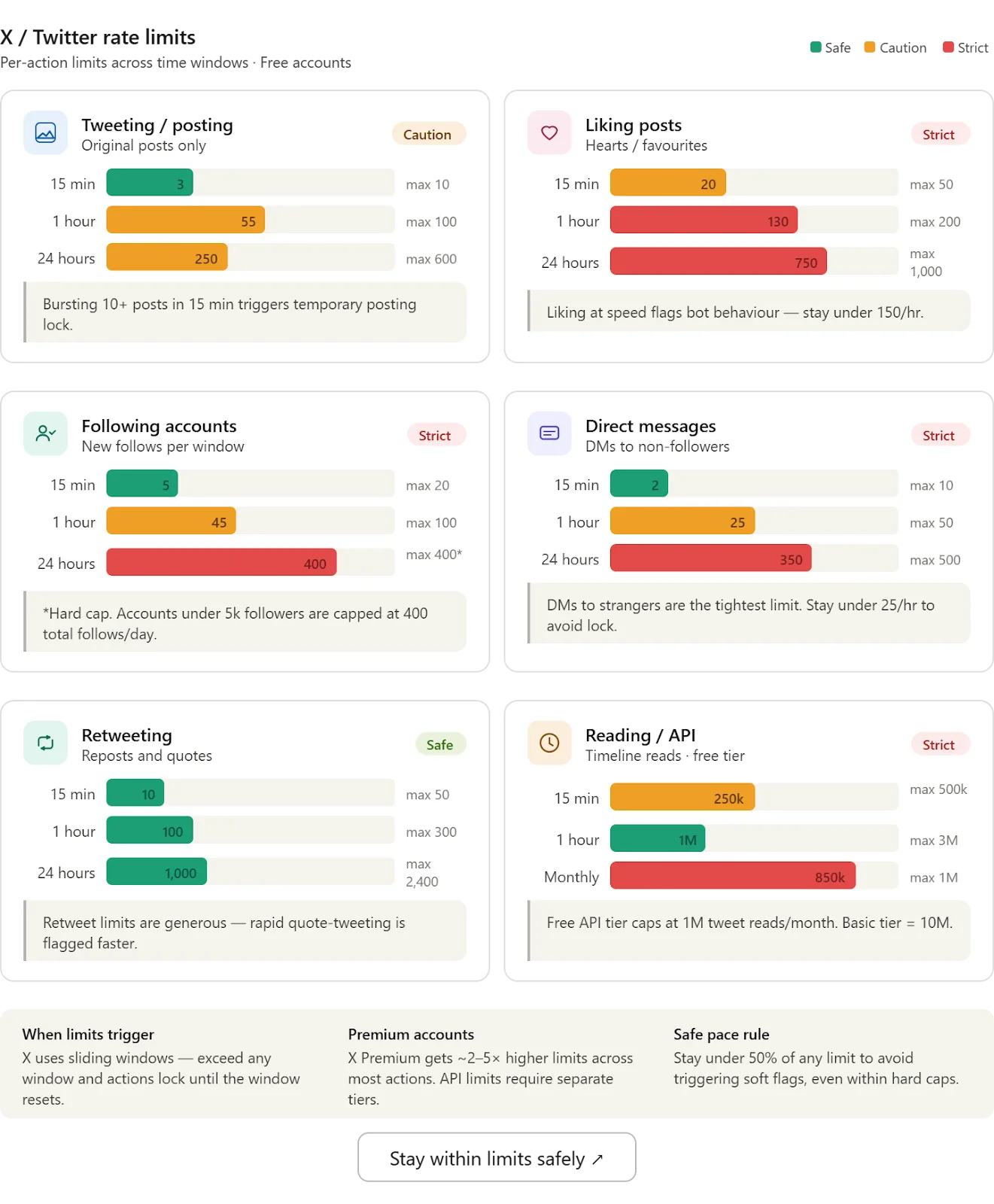
These limits apply to a wide range of activities, including posting tweets, liking content, following users, sending messages, and even loading timelines through the API.
The important thing to understand is that rate limits are not just about volume. They also factor in behavior patterns, timing, and consistency. This means you could trigger limits even with relatively low activity if your behavior appears unnatural or automated.
Why Twitter Enforces Rate Limits
Twitter’s primary goal is to maintain a high-quality user experience. Without rate limits, the platform would be flooded with spam, automated bots, and manipulative behavior that degrades trust and usability.
Rate limits serve several purposes. They prevent abuse by restricting how quickly accounts can perform repetitive actions, ensuring that no single user overwhelms the system. They also help maintain platform stability by controlling the load on Twitter’s infrastructure.
Another critical reason is behavioral analysis. By enforcing limits, Twitter can identify accounts that attempt to bypass restrictions, which often indicates automation or malicious intent.
For legitimate users, this means one thing: if your activity resembles spam—even unintentionally—you’ll face restrictions.
Common Triggers That Cause Rate Limits
Excessive Actions in a Short Time
Performing too many actions too quickly is the most common trigger. This includes liking dozens of tweets within minutes, sending multiple replies rapidly, or following many accounts in a short burst.
Repetitive Behavior Patterns
Even if your volume is moderate, repeating the exact same action pattern—such as liking every 5 seconds or posting identical tweets—can trigger limits. Twitter’s systems are designed to detect patterns that don’t align with human behavior.
Aggressive Automation
Automation tools can easily exceed safe thresholds if not configured properly. Running workflows without delays, randomization, or limits often leads to rate limit errors.
A structured platform like Appilot helps avoid this by introducing variability into workflows, spacing out actions, and ensuring that activity mimics natural human interaction rather than robotic patterns.
API Usage Limits
If you’re using scripts or developer tools, API rate limits are another factor. These are stricter than standard user limits and apply to data fetching, posting, and other programmatic interactions.
Multiple Accounts on One IP
Managing several accounts from the same IP address can amplify activity signals. Even if each account stays within limits individually, the combined behavior may trigger restrictions.
How to Fix “Rate Limit Exceeded” Immediately
When you hit a rate limit, the worst thing you can do is keep trying to perform actions. This only extends the restriction period and increases the risk of further penalties.
The first step is to stop all activity immediately. Give your account time to cool down. In most cases, limits reset automatically after a short period.
Next, log out and log back in after some time. This can help refresh your session and clear temporary blocks. If you’re using multiple devices or tools, ensure that all sessions are paused.
If the issue persists, verify your account details such as phone number and email. Twitter sometimes requires additional verification to confirm that your account is legitimate.
Finally, reduce your activity significantly once access is restored. Gradually return to normal usage instead of jumping back into high-volume actions.
Preventing Rate Limits with Smarter Activity
Avoiding rate limits requires a shift from high-speed activity to structured, human-like behavior.
Instead of performing actions in bursts, spread them out over time. Think of how a real user behaves—they don’t like 50 tweets in 2 minutes or follow 100 accounts instantly. They interact gradually throughout the day.
Introduce randomness into your activity. This means varying the timing between actions, changing the sequence of interactions, and avoiding repetitive patterns.
For example, instead of liking posts every 10 seconds, vary the interval between 20 and 90 seconds. Instead of posting at the exact same time daily, shift your schedule slightly.
Automation can still play a role, but it must be controlled. Tools like Appilot allow you to define limits, delays, and randomized behavior, ensuring that automation enhances efficiency without crossing Twitter’s thresholds.
Safe Automation Strategies That Actually Work
Automation is often blamed for rate limits, but the problem isn’t automation itself—it’s how it’s used.
Safe automation focuses on mimicking natural human behavior. This means introducing delays, limiting daily actions, and ensuring that workflows are not repetitive or predictable.
A well-structured automation setup includes three key elements: timing control, action limits, and variability. Timing control ensures that actions are spaced out realistically. Action limits prevent excessive activity. Variability introduces randomness to avoid detectable patterns.
With Appilot, you can create workflows that respect these principles. For example, you can schedule tweets with randomized intervals, limit likes per hour, and distribute actions across multiple accounts without creating synchronized patterns.
This approach allows you to scale your activity safely while maintaining compliance with Twitter’s rules.
Long-Term Strategy for Scaling Without Limits
Scaling on Twitter requires balancing activity volume with account health. Instead of pushing a single account to its limits, distribute actions across multiple accounts where appropriate.
Maintain a consistent but moderate activity level. Sudden spikes in activity often trigger limits, while steady growth signals authenticity.
Monitor your analytics regularly. If you notice declining engagement or increasing restrictions, adjust your strategy immediately. Early intervention prevents bigger issues later.
Invest in quality over quantity. High-value content generates organic engagement, reducing the need for aggressive actions that risk triggering limits.
Finally, treat automation as a support tool, not a replacement for genuine interaction. Combining manual engagement with controlled automation creates a sustainable growth strategy.
Real-World Example
A digital marketing team managing several Twitter accounts frequently hit rate limits due to aggressive posting and engagement scripts. Their workflows involved rapid actions with no delays, causing repeated restrictions.
After restructuring their approach using Appilot, they introduced randomized delays, capped daily actions, and distributed activity across different time slots. Within a week, rate limit errors dropped to zero, and engagement increased due to more natural interaction patterns.
This demonstrates that the right balance of automation and human-like behavior can eliminate rate limit issues while improving overall performance.
Frequently Asked Questions
Q: How long does a Twitter rate limit last?
A: Most rate limits reset within minutes to a few hours, but repeated violations can extend this duration.
Q: Can I bypass rate limits?
A: Attempting to bypass limits often leads to stricter restrictions or account penalties. It’s better to adjust your behavior to stay within safe thresholds.
Q: Does automation always trigger rate limits?
A: No. Properly configured automation with delays and limits can operate safely without triggering restrictions.
Q: Should I stop using automation entirely?
A: Not necessarily. Smart automation, when used responsibly, can improve efficiency without violating Twitter’s rules.
Conclusion
Twitter’s rate limits are not obstacles—they are guidelines that define safe and sustainable activity on the platform. When you exceed them, it’s a signal that your behavior needs adjustment, not abandonment.
By understanding how these limits work, identifying triggers, and implementing smarter activity patterns, you can prevent disruptions and maintain consistent performance.
Automation, when used correctly, becomes a powerful ally rather than a risk. With tools like Appilot, you can structure workflows that mimic natural behavior, avoid limits, and scale efficiently.
The key is balance. Stay within limits, prioritize quality interactions, and build workflows that align with how real users behave. Do that, and you’ll never have to deal with “rate limit exceeded” errors again.