Twitter Suspended Your Account for "Automation"? Recovery Steps
You log into Twitter expecting to check notifications or continue your growth efforts, but instead you’re greeted with a suspension notice stating your account has been flagged for “automation,” and suddenly everything stops because you can no longer tweet, follow, like, or even access your account normally. It feels abrupt and confusing, especially if you believed you were using automation responsibly or simply following a consistent posting routine.
For marketers, founders, and growth operators who rely on Twitter for audience building or lead generation, this kind of suspension is more than a temporary inconvenience because it disrupts momentum, damages credibility, and can potentially erase months or even years of work. The uncertainty makes it worse, because you’re left wondering whether the suspension is permanent, what exactly triggered it, and whether you can safely recover without making things worse.
As your automation usage scales, the risk increases if your workflows are not aligned with how Twitter evaluates behavior, because the platform monitors patterns such as frequency, repetition, and unnatural activity across accounts. You may have been sending too many similar actions, running tasks too quickly, or using tools in a way that appears automated rather than human-like.
There is a structured way to recover your account and prevent this from happening again. Instead of guessing or panicking, you can follow a clear recovery process, understand what triggered the suspension, and rebuild your automation workflows using safer practices and tools like Appilot that help simulate natural behavior and manage activity intelligently.
In this guide, you will learn why Twitter suspends accounts for automation, how to recover your account step by step, and how to rebuild your workflows so that you can scale safely without triggering future suspensions. You will also learn how to balance automation with authenticity to maintain long-term account health.
Setup time for recovery is typically 30 to 60 minutes, difficulty is intermediate, and the potential return is high because restoring a suspended account allows you to regain access to your audience, content, and growth pipeline.
Why Automation Suspensions Matter in 2026
Twitter has become increasingly strict about automation because the platform aims to maintain authenticity and prevent spam, manipulation, and coordinated inauthentic behavior. Over the years, it has introduced more advanced detection systems that analyze how accounts behave rather than just what tools they use.
Today, Twitter evaluates multiple signals when determining whether an account is engaging in prohibited automation. These signals include how frequently actions are performed, whether patterns repeat exactly, how quickly tasks are executed, and whether multiple accounts exhibit similar behavior. Even if you are using legitimate tools, the way you use them can trigger a suspension if your activity appears unnatural.
For professionals using Twitter as a growth channel, this creates a significant challenge because automation is often necessary to scale, but improper usage can lead to account loss. A marketer managing multiple campaigns might perform hundreds of actions daily, and without proper structuring, this activity can easily cross thresholds that trigger detection systems.
When you break it down, the risk becomes clear. Performing 500 actions per day with identical timing and patterns is far more likely to be flagged than performing the same number of actions distributed across time with variability. The difference lies not in the volume but in the behavior.
This is why understanding how Twitter evaluates automation is critical for both recovery and long-term success.
What You Need to Get Started
Recovering and safely automating your Twitter account requires a combination of tools and best practices rather than relying on a single solution.
At a minimum, you need access to your suspended account, a stable internet connection, and a clear understanding of your previous activity. If you plan to resume automation after recovery, you will also need an antidetect browser such as GoLogin for managing multiple profiles and an automation platform like Appilot to structure workflows safely.
Using residential proxies is recommended if you are managing multiple accounts or operating across different regions, as they help maintain consistent identity signals and reduce detection risk. Additional tools such as analytics platforms can help track performance but are optional.
The cost of a safe automation setup typically ranges from $100 to $300 per month depending on scale. When compared to the potential loss of a suspended account, this investment is relatively small.
Step-by-Step: Recovering Your Suspended Twitter Account
Step 1: Understand the Suspension Type
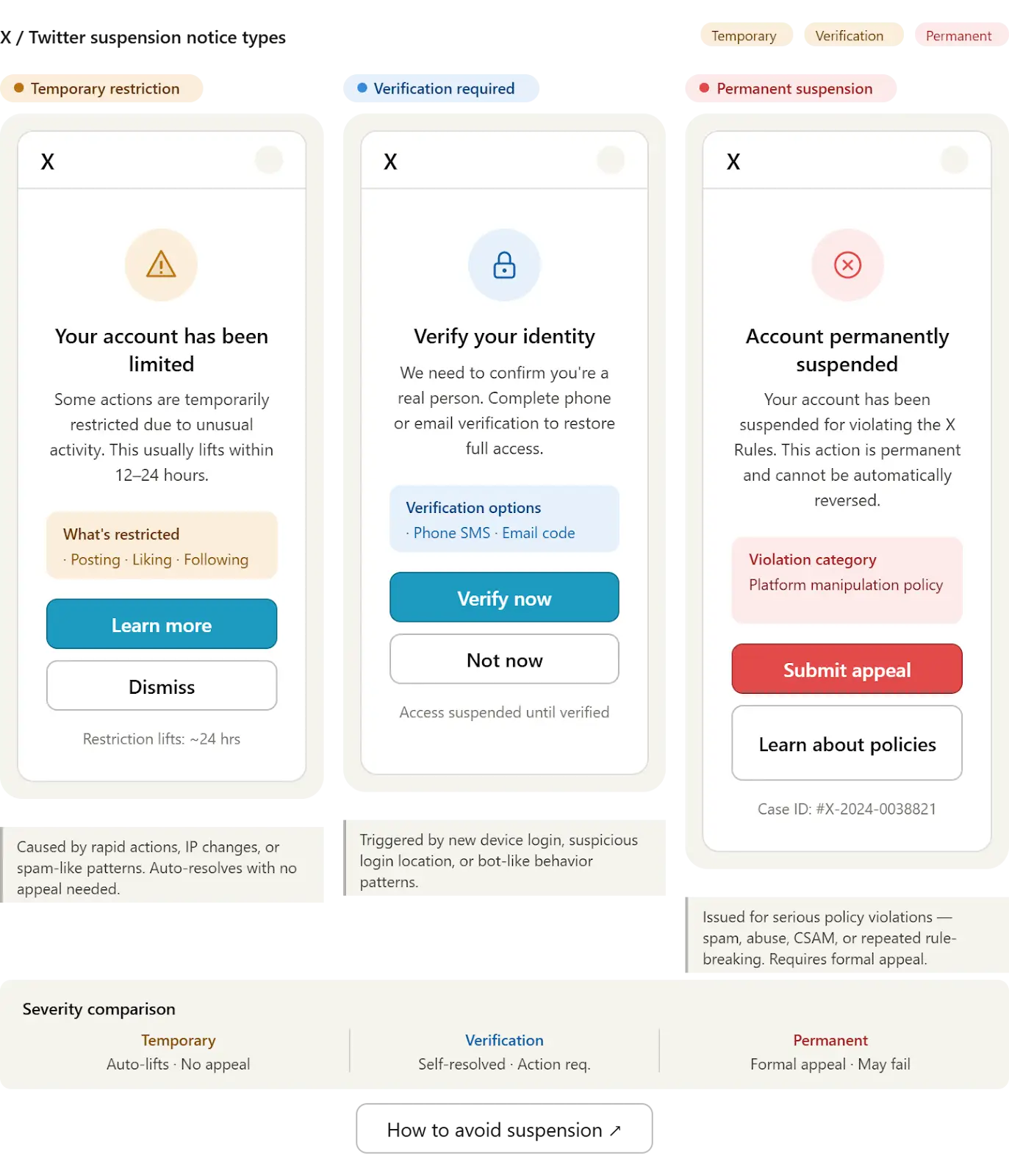
Not all suspensions are the same. Some are temporary restrictions, while others require manual appeal. Identifying the type of suspension helps determine the correct recovery approach.
Temporary suspensions often resolve after verifying your identity, while more serious suspensions require submitting an appeal and waiting for review.
Step 2: Verify Your Account
In many cases, Twitter will ask you to verify your account through phone or email confirmation. Completing this step is often the fastest way to regain access.
Ensure that your contact information is accurate and accessible before proceeding.
Step 3: Submit an Appeal
If verification alone does not resolve the issue, you need to submit an appeal through Twitter’s support system. In your appeal, clearly explain that you are a legitimate user, describe your activity, and request a review.
Avoid admitting to intentional rule violations, but be honest about your usage and emphasize that you aim to comply with platform guidelines.
Step 4: Pause All Automation
Before attempting recovery, stop all automation activities. Continuing automated actions during a suspension can worsen the situation and reduce the chances of recovery.
Step 5: Wait and Monitor
After submitting your appeal, you need to wait for Twitter’s response. This can take anywhere from a few hours to several days depending on the case.
Monitor your email for updates and avoid repeated submissions, as this can delay the process.
Rebuilding Your Automation Safely
Once your account is recovered, the next step is to rebuild your automation workflows in a way that avoids future suspensions.
Instead of returning to previous habits, you need to implement structured workflows that prioritize safety and consistency. This includes setting limits on daily actions, introducing random delays, and avoiding repetitive patterns.
This is where Appilot becomes useful because it allows you to create workflows that mimic natural behavior, schedule tasks intelligently, and manage multiple accounts without creating detectable patterns.
You can achieve similar results with tools like Appium, but Appilot simplifies the process by providing a centralized interface and built-in safety features.
Safety and Best Practices
To avoid future suspensions, you need to follow key principles that align with how Twitter evaluates behavior. This includes respecting platform limits, avoiding repetitive actions, and maintaining variability in your activity.
Randomization is essential because human behavior is inherently inconsistent. Introducing variation in timing, action sequences, and interaction patterns helps reduce detection risk.
Account warm-up is also important, especially after recovery. Gradually increasing activity over time mimics natural usage and reduces the likelihood of triggering detection systems.
Real Results: What to Expect
In the first week after recovery, your focus should be on stabilizing your account and ensuring that no further issues arise. Activity should be minimal and gradually increase over time.
By the second to fourth week, you can begin scaling your workflows while maintaining safety measures. At this stage, your account should show stable behavior and consistent engagement.
After one to two months, you can operate at full scale with optimized workflows that balance efficiency and safety.
A typical case shows users recovering accounts within a few days and successfully resuming automation without further suspensions by following structured practices.
Common Problems and Solutions
One common issue is delayed recovery after submitting an appeal. This can occur due to high support volume or incomplete information. Ensuring that your appeal is clear and complete helps reduce delays.
Another issue is repeated suspensions after recovery, often caused by returning to unsafe automation practices. Adjusting workflows and introducing variability resolves this problem.
Users may also experience reduced engagement after recovery, which can be addressed by gradually rebuilding activity and interacting authentically.
Choosing the Right Tools
GoLogin is useful for managing multiple accounts safely, while Appilot provides a streamlined way to automate workflows without creating detectable patterns.
For advanced users, tools like Appium offer more control but require more setup and maintenance. For most users, a managed solution provides the best balance between ease of use and scalability.
Scaling Safely After Recovery
As you scale your activity, maintaining balance becomes more important. Increasing volume too quickly can trigger detection systems, so gradual scaling is essential.
At higher scales, monitoring and optimization become critical to ensure consistent performance and avoid issues.
Frequently Asked Questions
Many users ask whether automation is allowed on Twitter. The answer depends on how it is used. Responsible automation that enhances productivity is generally acceptable, while abusive or manipulative behavior is not.
Another common question is whether accounts can be permanently banned. While severe violations can lead to permanent suspension, most cases can be resolved through verification and appeal.
Users also want to know how long recovery takes. This varies depending on the situation but typically ranges from a few hours to several days.
Conclusion
A Twitter suspension for automation is not the end of your account but a signal that your workflows need adjustment. By understanding what triggered the suspension and following a structured recovery process, you can regain access and rebuild your automation safely.
The key is to focus on natural behavior, consistent activity, and responsible scaling rather than aggressive automation.