What Is Viewport Behavior? How Scrolling Patterns Expose Bots
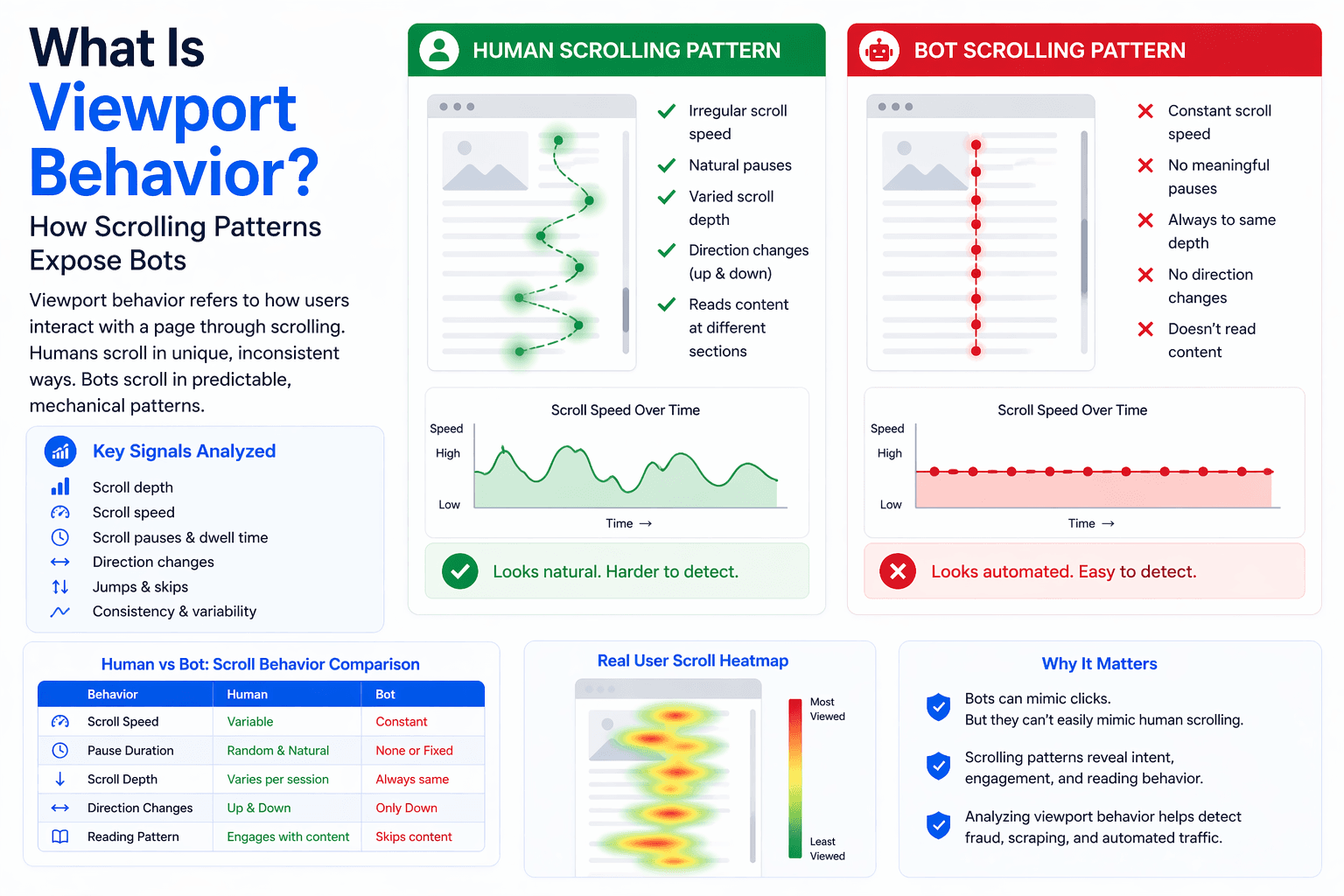
As bot detection systems evolve, they increasingly focus on how users interact with what is actually visible on their screen. This concept, known as viewport behavior, goes beyond simple scrolling and analyzes how users engage with content within the visible area of a webpage. Because it reflects real-time attention and interaction, viewport behavior is a powerful signal for distinguishing humans from bots.
Understanding viewport behavior is important because it connects user actions with what they are seeing, making it harder for automation to mimic naturally. This guide explains how it works and how it is used in detection systems.
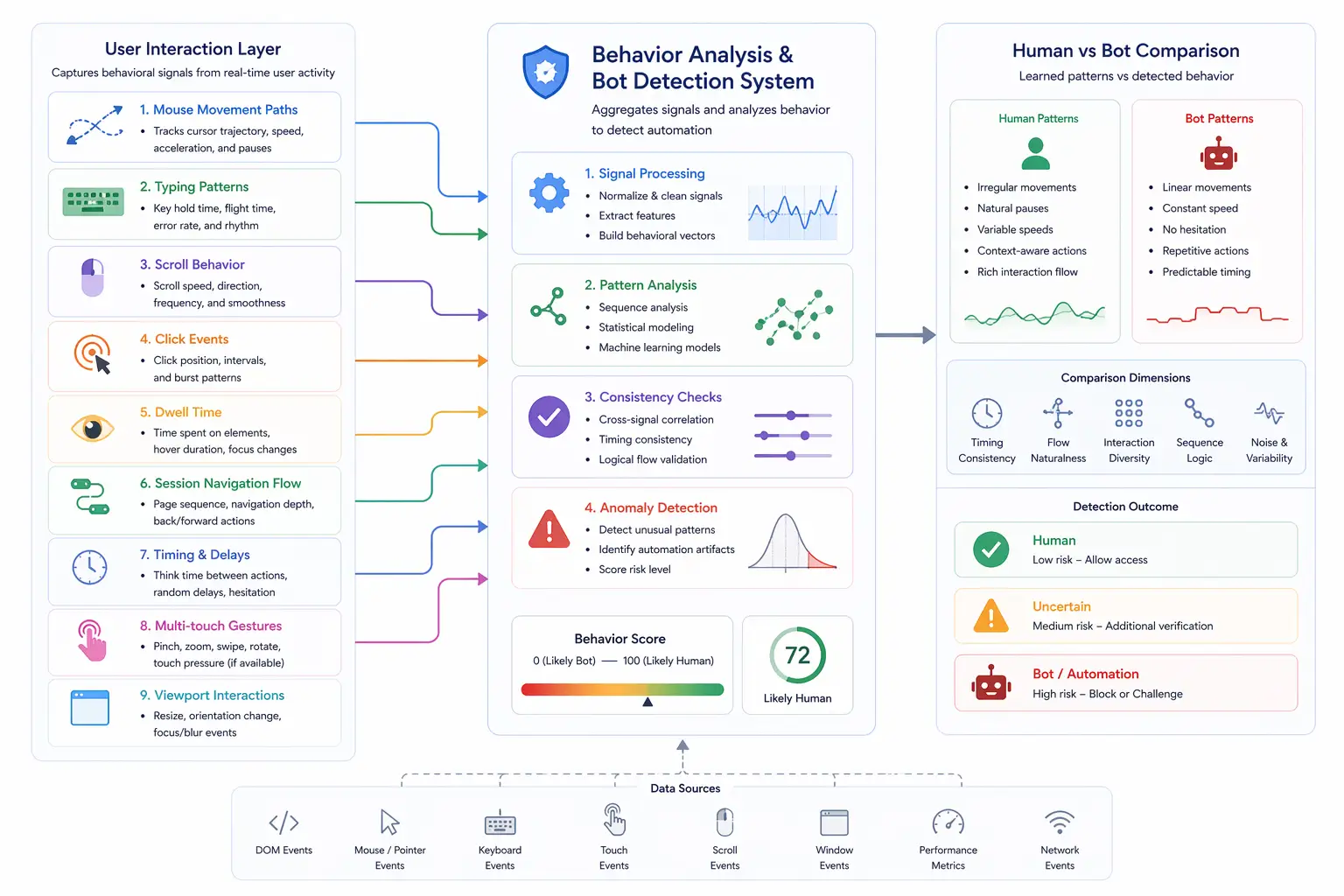
What Is Viewport Behavior?
Viewport behavior refers to how users interact with the visible portion of a webpage, known as the viewport, where it includes actions such as scrolling, pausing, focusing on elements, and navigating content within the screen. Instead of analyzing the entire page, detection systems focus on what is currently in view and how the user responds to it. This provides insight into attention and engagement.
The Core Idea Behind Viewport Analysis
The core idea behind viewport analysis is that real users interact with content they can see, where their actions are influenced by what is currently displayed on the screen. Humans tend to scroll, pause, and engage based on content relevance, while bots often perform actions without considering visibility. Detection systems use this relationship between visibility and interaction to identify authentic behavior.
How Viewport Behavior Is Tracked
Viewport behavior is tracked using JavaScript that monitors scroll position, element visibility, and user interaction events, where techniques such as intersection observation and scroll tracking determine which parts of the page are visible at any given time. By combining these signals, systems can analyze how users interact with content within the viewport.
Key Characteristics of Human Viewport Behavior
Human viewport behavior includes natural scrolling, pauses to read content, and interactions with visible elements, where users tend to focus on one section at a time and adjust their behavior based on interest. They may scroll slowly through complex content, skip irrelevant sections, or return to previously viewed areas. These patterns reflect attention and decision-making, creating behavior that is context-driven and irregular.
Common Bot Viewport Patterns
Bot viewport patterns often lack alignment between visibility and interaction, where actions may occur on elements that are not visible or scrolling may happen without pauses or engagement. Bots may scroll at constant speeds, jump between positions, or interact with elements instantly after they appear. These patterns indicate a lack of real user attention and are strong signals of automation.
Why Viewport Behavior Analysis Is Effective
Viewport behavior analysis is effective because it connects user actions with visible content, making it difficult for bots to simulate realistic interaction. Detection systems can evaluate whether actions make sense in context, such as clicking only when an element is visible or pausing long enough to read content. This adds a layer of validation that goes beyond simple behavior tracking.
Viewport Behavior vs Scroll Behavior
Scroll behavior focuses on how users move through a page, while viewport behavior focuses on how they interact with what is currently visible. While scrolling provides information about navigation, viewport analysis provides insight into attention and engagement. Combining both signals creates a more complete understanding of user behavior.
Limitations of Viewport Behavior Analysis
Despite its effectiveness, viewport behavior analysis has limitations because user behavior can vary widely depending on device type, content, and individual preferences, where some users may scroll quickly or interact minimally. These variations can lead to false positives if not properly accounted for. Additionally, advanced automation tools may attempt to simulate viewport-aware behavior.
Viewport Simulation vs Real Behavior
A key distinction in modern detection is the difference between simulated viewport interaction and natural behavior, where simulated systems attempt to align actions with visible content but often lack the depth of real user engagement. Real users interact based on attention, comprehension, and intent, creating patterns that are difficult to replicate accurately. Detection systems focus on these differences.
Viewport Behavior vs Real-Device Environments
Another important distinction is between simulated environments and real-device environments, where simulated setups generate viewport interactions through scripts, while real-device environments reflect actual user interaction or realistic system behavior. Tools like Appilot follow this approach by running automation on real Android devices, where viewport behavior, timing, and interaction patterns align with real-world usage. This reduces inconsistencies that detection systems rely on.
When Viewport Behavior Is Most Critical
Viewport behavior analysis is most critical in scenarios where user attention and interaction are closely monitored, such as content platforms, advertising systems, and high-security applications, where distinguishing between genuine engagement and automated activity is essential. In these contexts, viewport behavior provides valuable insight into user authenticity.
Frequently Asked Questions
Q: What is viewport behavior?
It is how users interact with visible content on a webpage.
Q: How does it detect bots?
By identifying actions that do not align with visible content.
Q: Is it different from scrolling?
Yes, it focuses on interaction within the visible area.
Q: Can bots simulate viewport behavior?
Yes, but it is difficult to match real user attention patterns.
Q: Is it used alone?
No, it is combined with other behavioral signals.
Q: How do real-device solutions compare?
Real-device solutions like Appilot produce natural viewport interactions, reducing detection risk.
Key Takeaways
Viewport behavior analyzes how users interact with the visible portion of a webpage, linking actions to what is actually seen on the screen. Human behavior is context-driven, with pauses and interactions aligned to visible content, while bot behavior often lacks this alignment. By evaluating these patterns, detection systems can effectively identify automation. Understanding viewport behavior is essential for navigating modern bot detection systems.