Understanding Virtual Browser Environments

Most users interact with browsers as if they are tied directly to their device, but modern systems allow browsers to run in virtualized environments that are separate from the physical machine. These setups are widely used in testing, automation, and remote workflows. However, they also introduce unique challenges when it comes to fingerprinting and detection.
Understanding virtual browser environments is important because they fundamentally change how browser signals are generated and interpreted. It also explains why some setups are easily detected despite appearing isolated. This guide explains what virtual browser environments are, how they work, and where they fit in real-world scenarios.
What Is a Virtual Browser Environment?
A virtual browser environment is a browser instance that runs inside a virtualized system rather than directly on a physical device. This can include virtual machines, containers, or cloud-based browser instances.
Instead of relying on the host machine’s native environment, the browser operates within a controlled virtual layer. This allows users to create multiple independent environments on a single physical device.
Each virtual environment can have its own operating system, browser configuration, and network setup, making it useful for testing and isolation.
The Core Principle Behind Virtualization
The core principle behind virtual browser environments is abstraction. The virtual layer separates the browser from the underlying hardware, allowing multiple environments to run independently.
This abstraction enables flexibility, as users can simulate different systems without needing multiple physical devices. However, it also means that the browser does not interact directly with real hardware.
This distinction becomes important in fingerprinting, where hardware-level signals play a significant role.
How Virtual Browser Environments Work
Virtual browser environments work by creating isolated systems that host browser instances.
Virtual Machines and Containers
One common approach is using virtual machines, where an entire operating system is emulated within software. Each virtual machine behaves like a separate computer with its own resources.
Another approach is using containers, which provide lightweight isolation without running a full operating system. Containers share the host system’s kernel but isolate applications and dependencies.
Both methods allow multiple browser instances to run independently, each within its own environment.
Resource Allocation and Emulation
Virtual environments rely on resource allocation and emulation to function. CPU, memory, and storage are assigned from the host system to each virtual instance.
In many cases, hardware behavior is emulated rather than directly accessed. This can affect how signals such as performance, rendering, and timing are generated.
These differences can be detected by systems that analyze hardware-level behavior.
Network and Remote Access
Virtual browser environments are often accessed remotely, especially in cloud-based setups. This allows users to run browsers on remote servers while interacting with them locally.
Network configuration can be customized for each environment, enabling different IP addresses and locations.
However, network-level signals must still align with other attributes to avoid detection.
Why Virtual Browser Environments Matter
Virtual browser environments matter because they enable scalability and isolation. They allow users to run multiple browser instances without needing multiple physical devices.
In testing environments, they are used to simulate different systems and configurations. In automation workflows, they help manage multiple sessions and tasks efficiently.
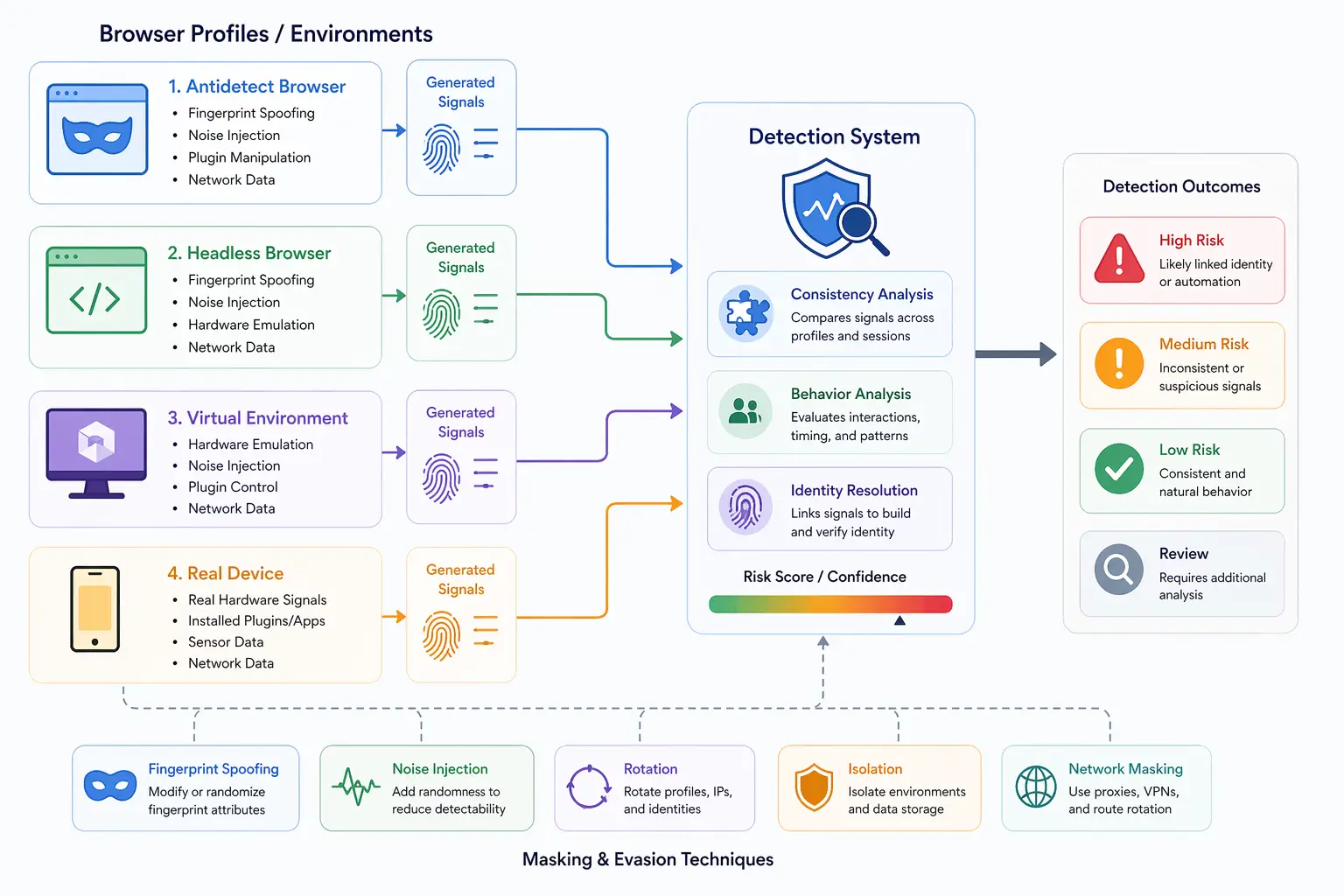
However, from a detection perspective, virtual environments can introduce identifiable patterns. The lack of direct hardware interaction and the presence of virtualization artifacts can make them easier to detect.
Fingerprinting Challenges in Virtual Environments
Virtual browser environments face several challenges when it comes to fingerprinting.
One major challenge is hardware abstraction. Since the browser does not interact directly with real hardware, signals such as CPU behavior, GPU rendering, and performance timing may appear different.
Another challenge is uniformity. Virtual environments often share similar configurations, which can make multiple instances appear alike.
There is also the issue of consistency. If virtualized signals do not align with other attributes, detection systems can identify inconsistencies.
These challenges make it difficult for virtual environments to fully replicate real-device behavior.
Virtual Environments vs Antidetect Browsers
Virtual browser environments and antidetect browsers serve different purposes but are often compared.
Antidetect browsers focus on modifying fingerprinting signals at the browser level, while virtual environments provide system-level isolation.
A useful way to understand this is that antidetect browsers simulate identities within a single system, while virtual environments create separate systems.
In practice, both approaches have limitations, especially when detection systems analyze deeper layers.
Virtual Environments vs Real Devices
A key distinction in modern detection systems is the difference between virtual environments and real devices.
Virtual environments rely on abstraction and emulation, which can introduce detectable patterns. Real devices, on the other hand, produce signals naturally through actual hardware and system behavior.
Tools like Appilot take the real-device approach by running automation on actual Android devices, ensuring that all signals, including hardware, rendering, and system behavior, align naturally without requiring emulation.
This difference becomes critical in environments where detection systems analyze multiple layers simultaneously.
Limitations of Virtual Browser Environments
While virtual environments provide flexibility, they have several limitations.
One limitation is detection risk. Advanced systems can identify virtualization artifacts and inconsistencies.
Another limitation is performance. Running multiple virtual instances can consume significant resources, affecting scalability.
There is also the challenge of maintaining realism. Simulating real-world behavior across all signals is difficult in virtualized setups.
Understanding these limitations is important when choosing the right approach.
When Virtual Browser Environments Make Sense
Virtual browser environments are useful in scenarios where isolation and scalability are more important than perfect realism.
They are effective for testing, development, and controlled automation workflows where detection risk is lower.
However, in scenarios involving advanced tracking and detection systems, additional approaches may be needed to achieve realistic behavior.
Frequently Asked Questions
Q: What is a virtual browser environment?
It is a browser running inside a virtualized system such as a virtual machine, container, or cloud instance.
Q: Why are virtual browser environments used?
They are used for testing, automation, and running multiple isolated browser instances.
Q: Are virtual environments detectable?
Yes, advanced detection systems can identify virtualization artifacts and inconsistencies.
Q: How do virtual environments differ from antidetect browsers?
Virtual environments provide system-level isolation, while antidetect browsers modify browser-level signals.
Q: Can virtual environments prevent fingerprinting?
They can reduce some tracking but do not eliminate fingerprinting, especially at deeper levels.
Q: How do real-device solutions compare?
Real-device solutions like Appilot produce natural signals through actual hardware, while virtual environments rely on emulation, which can introduce detectable patterns.
Key Takeaways
Virtual browser environments are systems that allow browsers to run in isolated, virtualized setups separate from physical hardware. They provide flexibility and scalability by enabling multiple independent environments on a single device. However, because they rely on abstraction and emulation, they can introduce detectable patterns in hardware behavior and system signals. While they are useful for testing and controlled workflows, their limitations become more apparent in advanced detection environments, where real-device consistency plays a critical role.