WebGL and Audio Fingerprinting: Advanced Detection Methods
By the time most people learn about canvas fingerprinting, modern detection systems have usually already evolved beyond it.
Today’s platforms rarely rely on a single signal. Instead, they stack multiple low-visibility fingerprints together to build confidence.
Two of the most powerful and least understood techniques are WebGL fingerprinting and audio fingerprinting.
These techniques do not track what you do. They measure how your hardware behaves internally in ways that are subtle, stable, and difficult to fake.
For this guide, I’ll occasionally refer to Appilot because the same principles apply across both browser and mobile automation. While Appilot focuses on Android automation running on real devices, the broader challenge of fingerprint consistency still matters whenever platforms evaluate hardware signals, session continuity, and device identity.
This guide explains how WebGL and audio fingerprinting work, why they are effective, what “bypassing” realistically means, and why most advice about them is incomplete.
Understanding WebGL and Audio Fingerprinting
WebGL and audio fingerprinting are hardware-influenced identification techniques.
Unlike cookies or storage-based identifiers, they derive signals from GPU behaviour, CPU floating-point precision, operating-system-level processing pipelines, and driver implementation details.
They do not store identifiers directly. Instead, they measure output characteristics.
Together with canvas fingerprinting, they form what could be considered the second generation of browser fingerprinting because they are deeper, quieter, and more resilient.
The Core Principle Behind Advanced Fingerprinting
Hardware is difficult to standardise.
When browsers ask a system to render 3D graphics or process audio signals, small differences appear because GPUs render differently, floating-point math varies, drivers optimise differently, and audio stacks behave uniquely.
When hardware processes a task, a repeatable and device-specific signal emerges.
That signal often remains stable across sessions, which gives it strong correlation power.
WebGL Fingerprinting Explained
WebGL is a JavaScript API that allows browsers to render 3D graphics using the GPU.
It is widely used for games, maps, visualisations, and user-interface effects.
However, it also exposes detailed hardware information.
How WebGL Fingerprinting Works
WebGL fingerprinting usually relies on two main methods.
Technique 1 – Parameter Enumeration
JavaScript queries WebGL for values such as GPU vendor, renderer string, shader precision, supported extensions, and texture limits.
These values alone can significantly narrow down a device profile.
Technique 2 – Rendering Output Tests
The browser renders a small off-screen 3D scene.
The resulting pixel output is extracted, converted into data, and hashed.
Even when the same code is used, the output differs because of GPU driver differences, floating-point math behaviour, and optimisation paths.
This creates a fingerprint that is stable, difficult to spoof, and heavily tied to the underlying hardware.
Why WebGL Fingerprints Are Powerful
WebGL fingerprints are highly distinctive, stable across sessions, and difficult to normalise.
Unlike canvas fingerprinting, which can sometimes be flattened or altered, WebGL depends much more heavily on GPU behaviour.
Masking it without degrading performance is extremely difficult.
Audio Fingerprinting Explained
Audio fingerprinting uses the Web Audio API.
It analyses how a system processes sound even when no sound is actually heard.
How Audio Fingerprinting Works
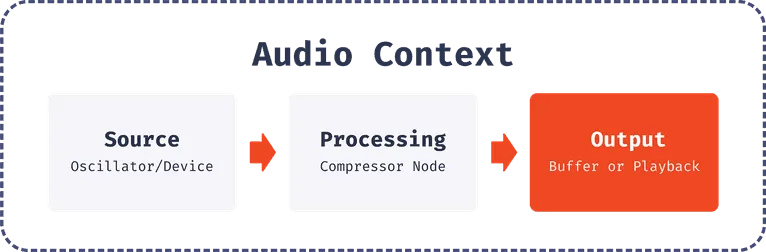
Stage 1 – Audio Graph Creation
JavaScript creates an audio context with oscillators, filters, and compressors.
No sound is played.
Stage 2 – Signal Processing
A short signal is generated and passed through the processing chain.
Stage 3 – Output Sampling
The processed signal is sampled numerically, converted into values, and hashed.
Differences emerge because of CPU floating-point precision, audio-driver implementation, and operating-system-level sound-stack behaviour.
These tiny differences are often consistent enough to fingerprint devices reliably.
Why Audio Fingerprinting Is Hard to Notice
Audio fingerprinting produces no visible change, requires no permissions, runs silently, and does not interrupt the user.
Most users, and even many developers, never realise it is happening.
How WebGL and Audio Fingerprinting Work Together
Modern detection systems rarely rely on a single signal.
Instead, they combine canvas fingerprints, WebGL fingerprints, audio fingerprints, behavioural signals, and session continuity.
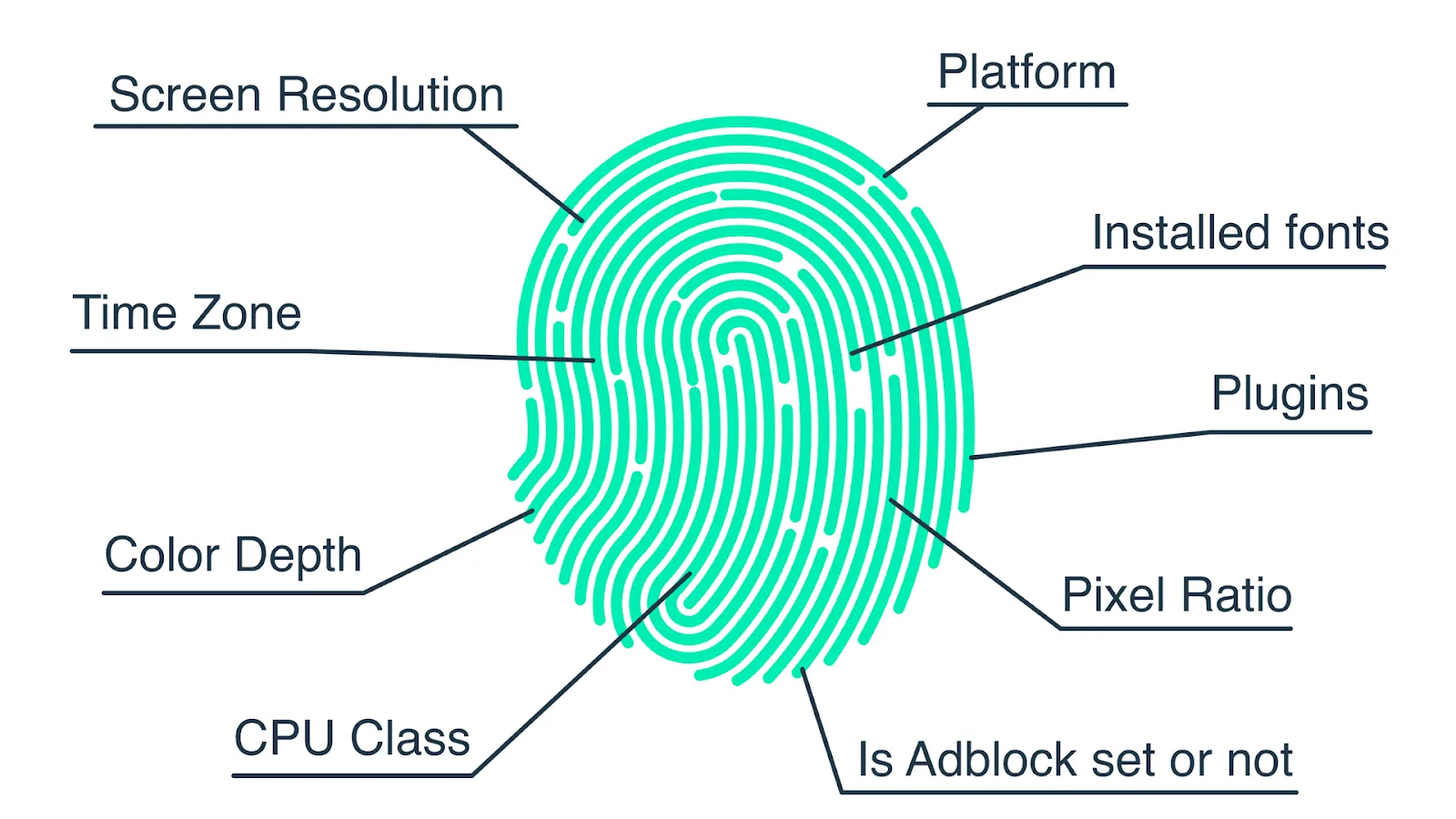
Each signal on its own may be imperfect, but together they form a high-confidence identity graph.
For example, if the canvas fingerprint changes but WebGL and audio remain stable, correlation still holds.
This layered design explains why clearing data often does not help, incognito mode feels ineffective, and “fresh” sessions still appear familiar to platforms.
Common Misconceptions About Advanced Fingerprinting
Misconception #1: “Disable WebGL or Audio”
Blocking these APIs often breaks websites, creates new anomalies, and makes a browser appear more unusual.
Being abnormal is often worse than being identifiable.
Misconception #2: “VPNs Prevent Fingerprinting”
These fingerprints are tied to hardware and device behaviour rather than network identity.
Changing IP addresses while keeping the same hardware fingerprint can actually increase suspicion.
Misconception #3: “This Is Only for Ads”
WebGL and audio fingerprinting are used heavily in fraud prevention, abuse detection, automation correlation, and account linking.
They are not limited to advertising.
What “Bypassing” WebGL and Audio Fingerprinting Really Means
Bypassing does not mean eliminating the signal completely.
It means managing correlation risk.
Strategy 1 – Reducing Uniqueness
Some environments try to appear more common.
If many users share similar hardware and software stacks, entropy decreases.
Strategy 2 – Controlled Variability
Believable variability over time weakens long-term correlation.
Random or unrealistic changes usually make things worse.
Strategy 3 – Signal Alignment
Advanced fingerprinting is rarely decisive on its own.
If behaviour looks human, sessions remain stable, and timing feels natural, then WebGL and audio fingerprints become supporting signals instead of direct blocking triggers.
This is why holistic alignment is usually more effective than aggressive suppression.
Real-World Contexts Where These Fingerprints Matter
Bot & Automation Detection
Large-scale automation running on identical browser stacks produces identical WebGL and audio outputs.
Correlation becomes easy.
This is one reason why platforms like Appilot rely on real-device execution rather than cloned browser environments. Real Android devices naturally produce more believable hardware variation and consistent operating-system signals.
Fraud & Abuse Prevention
Platforms often link repeat abuse attempts across supposedly “new” sessions by stacking multiple fingerprinting methods together.
Privacy-Sensitive Browsing
Privacy-focused browsers tend to prioritise normalisation and entropy reduction instead of aggressive blocking.
The Technical Reality
WebGL and audio fingerprints depend on the GPU, CPU, drivers, operating-system build, and browser engine.
That makes simple spoofing unreliable.
Normalising these signals without breaking compatibility is extremely difficult.
Browsers constantly need to balance privacy, performance, and stability.
That is why most practical mitigations focus on reducing entropy rather than eliminating fingerprinting completely.
When These Fingerprints Are a Real Risk
1. Identical Environments at Scale
Cloned setups dramatically amplify correlation.
2. Frequent “Clean” Sessions
Resetting storage while keeping hardware constant increases reliance on fingerprint signals.
3. High-Security Platforms
Finance, advertising, and abuse-sensitive platforms often weigh these signals heavily.
This explains why advanced sites may still recognise a device even after cookies, sessions, and IP addresses have changed.
The hardware behaviour remains the same.
Tools That Help Reduce Fingerprint Correlation
There are different ways to manage fingerprint consistency depending on the type of automation being used.
Puppeteer allows fine control over browser environments and fingerprint alignment.
Playwright provides better cross-browser support and stronger session handling.
Antidetect browsers attempt to manage browser-level fingerprint variation, although unrealistic configurations can still fail.
Appilot is useful for mobile automation because it runs workflows on real Android devices, where hardware signals, operating-system behaviour, and user interactions naturally align.
The best option depends on whether your goal is browser automation, mobile automation, or large-scale multi-account workflows.
Key Takeaways
WebGL and audio fingerprinting represent the deeper end of browser detection.
These techniques measure hardware behaviour rather than storage, they are strongest when environments remain stable and identical, and “bypassing” them is really about reducing confidence rather than disappearing completely.
Holistic design is far more effective than simply trying to suppress individual signals.
When these fingerprints are understood as part of a broader multi-signal detection stack, their power becomes much easier to manage.
If you are running large-scale mobile automation, Appilot can reduce fingerprint correlation by relying on real Android devices rather than identical virtual browser environments.
Frequently Asked Questions
Q: What is WebGL fingerprinting used for?
It is used to identify devices based on GPU capabilities and rendering behaviour.
Q: How does audio fingerprinting identify browsers?
It measures subtle differences in how systems process audio signals.
Q: Can I completely disable these fingerprints?
Not safely. Blocking these APIs often breaks websites or creates new detectable anomalies.
Q: Are these methods legal?
Legality depends on the jurisdiction and any disclosure requirements.
Q: Why do automation systems struggle with these techniques?
Because identical hardware and browser stacks produce identical outputs at scale.