What Are Proxies? Complete Guide for Browser Automation

When running browser automation at scale, one of the first challenges you encounter is network identity. Every request your browser makes includes an IP address, and this IP is one of the strongest signals websites use to track and identify users. Simply automating actions without managing this layer quickly leads to rate limits, blocks, or flagged sessions. This is where proxies become essential.
Understanding proxies is important because they control how your traffic appears to websites. They are a core component of any automation setup and play a critical role in separating identities, managing sessions, and reducing detection risk. This guide explains what proxies are, how they work, and how they are used in browser automation.
What Are Proxies?
A proxy is an intermediary server that sits between your device and the internet. Instead of sending requests directly to a website, your traffic is routed through the proxy, which forwards the request on your behalf.
From the website’s perspective, the request appears to come from the proxy’s IP address rather than your actual device. This allows you to control and change your visible network identity.
Proxies are widely used for privacy, security, and automation because they allow users to manage how their traffic is presented to external systems.
The Core Principle Behind Proxies
The core principle behind proxies is identity substitution. Websites identify users based on IP addresses, so changing the IP changes how the user is perceived.
By routing traffic through different proxy servers, it is possible to simulate requests coming from different locations or users. This is particularly useful in automation workflows where multiple sessions need to remain separate.
However, proxies only affect the network layer. They do not change browser or device-level signals, which must be managed separately.
How Proxies Work
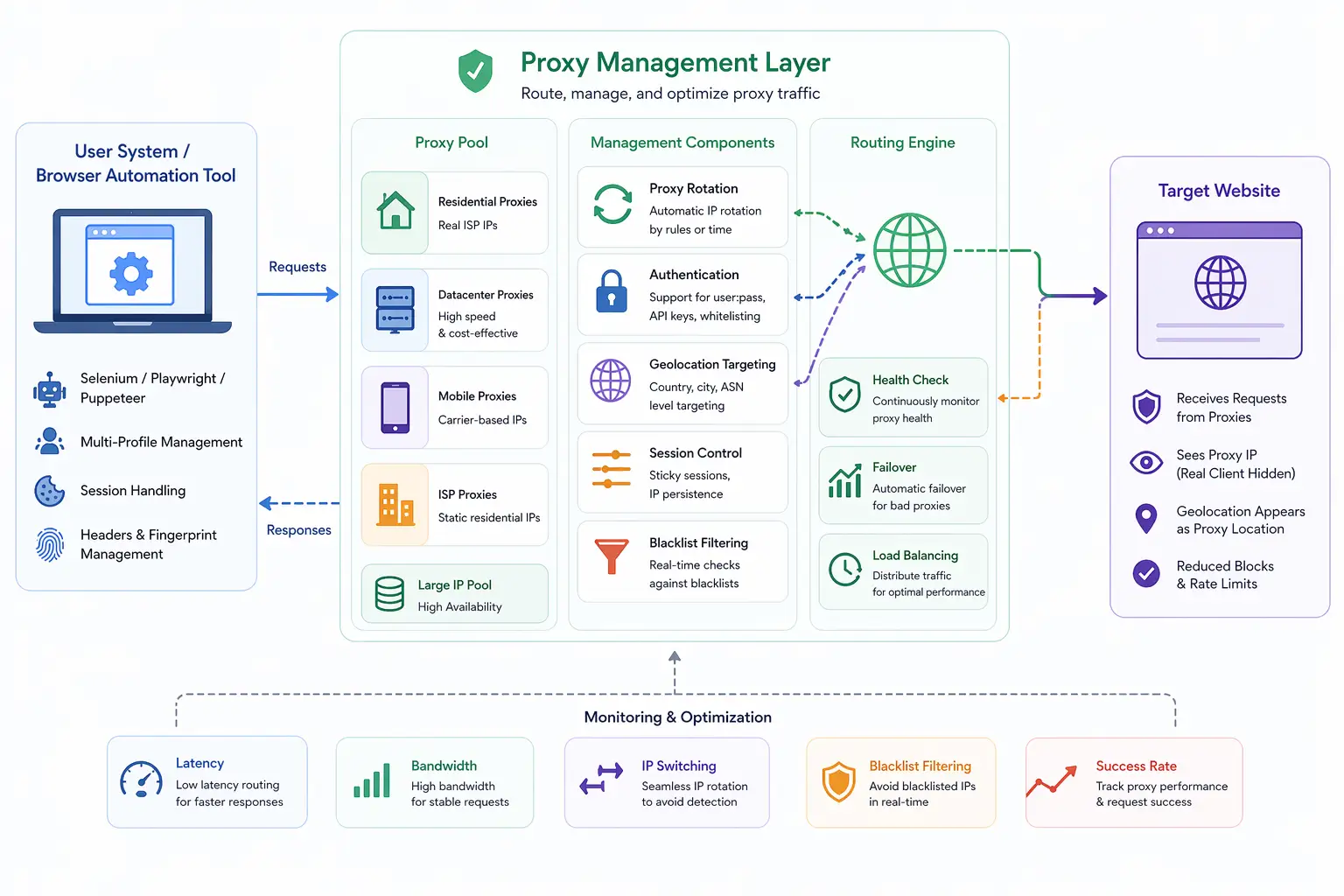
Proxies work by receiving your request, forwarding it to the target server, and then returning the response back to you.
When a browser sends a request through a proxy, the proxy replaces your IP address with its own before forwarding the request. The target website processes the request and sends the response back to the proxy, which then passes it to your browser.
This process is transparent to the user but changes how the request appears externally.
Request Flow Through a Proxy
When you access a website using a proxy, the browser first connects to the proxy server instead of the destination site. The proxy then makes the request on your behalf and returns the response.
This creates a separation between your actual device and the website, allowing you to control how your identity is presented.
Types of Proxies
There are several types of proxies used in browser automation, each with different characteristics.
Residential proxies use IP addresses assigned to real devices by internet service providers, making them appear more like genuine users. Datacenter proxies come from cloud servers and are faster but easier to detect. Mobile proxies use IP addresses from mobile networks, which often have higher trust levels due to shared usage patterns.
Choosing the right type of proxy depends on the use case and the level of detection risk.
Why Proxies Matter in Browser Automation
Proxies are critical in browser automation because they allow multiple sessions to operate without being linked by IP address.
Without proxies, all automated requests originate from the same IP, making it easy for websites to detect unusual activity. This can lead to rate limiting, captchas, or account bans.
By assigning different proxies to different sessions, each session appears as a separate user. This helps maintain separation and reduces detection risk.
However, proxies alone are not sufficient. They must be combined with consistent browser and device-level signals to create realistic environments.
Proxies and Fingerprinting
While proxies change your IP address, they do not affect browser fingerprinting signals such as screen resolution, hardware behavior, or rendering output.
Detection systems combine IP data with fingerprinting signals to build a complete profile. If multiple sessions use different IPs but share the same fingerprint, they can still be linked.
This is why proxies must be used alongside other techniques such as profile isolation and consistent fingerprint management.
Common Mistakes When Using Proxies
One common mistake is using low-quality proxies. Datacenter proxies, while fast, are often flagged quickly because they are associated with automated traffic.
Another mistake is mismatching location data. For example, using a proxy from one country while the browser reports a different timezone or language can create inconsistencies.
There is also the issue of overuse. Sending too many requests from the same proxy can lead to rate limits or bans.
These mistakes highlight the importance of proper configuration and usage.
Proxies vs VPNs
Proxies and VPNs are often confused, but they serve different purposes.
A VPN routes all traffic from your device through a secure server, while a proxy typically handles specific applications or browser traffic. VPNs focus on privacy and encryption, while proxies focus on identity management and scalability.
In automation workflows, proxies are preferred because they allow granular control over individual sessions.
Proxies vs Real-Device Environments
A key distinction in modern detection systems is the difference between network-level identity and full environment realism.
Proxies only change the IP address, but they do not affect how the browser or device behaves. This can lead to inconsistencies if other signals do not align.
Real-device approaches operate on actual hardware, where network, browser, and device signals naturally align. Tools like Appilot follow this approach by running automation on real Android devices, ensuring that all layers of the environment are consistent without relying solely on proxy-based identity changes.
This creates a more realistic setup compared to using proxies alone.
When Proxies Are Essential
Proxies are essential in scenarios where multiple sessions need to run simultaneously without being linked.
They are widely used in automation, testing, data collection, and account management workflows. In these scenarios, controlling network identity is critical for maintaining separation and avoiding detection.
However, proxies should be part of a broader strategy that includes consistent fingerprinting and realistic behavior.
Frequently Asked Questions
Q: What is a proxy?
A proxy is a server that routes your internet traffic and replaces your IP address with its own.
Q: Why are proxies used in browser automation?
They allow multiple sessions to appear as different users by using different IP addresses.
Q: What are the types of proxies?
Common types include residential, datacenter, and mobile proxies.
Q: Do proxies prevent fingerprinting?
No, they only change IP addresses. Fingerprinting signals must be managed separately.
Q: Are proxies better than VPNs for automation?
Yes, because proxies allow per-session control, while VPNs affect the entire device.
Q: How do real-device solutions compare?
Real-device solutions like Appilot combine network, browser, and hardware consistency, while proxies only handle network identity.
Key Takeaways
Proxies are intermediary servers that allow you to control how your network identity appears to websites by routing traffic through different IP addresses. They are a fundamental component of browser automation, enabling multiple sessions to operate independently without being linked by IP. While proxies are effective at managing network-level identity, they do not affect browser or device-level signals, making it important to combine them with other techniques. Understanding how proxies work and how to use them correctly is essential for building reliable and realistic automation environments.