What Are Stealth Plugins? Hiding Automation Signals
Most automation tools work by controlling browsers programmatically, but this introduces detectable signals that websites can use to identify non-human activity. To address this, stealth plugins are used to mask or modify these signals so that automated environments appear more like real user sessions.
Understanding stealth plugins is important because they represent one of the most commonly used approaches to reducing detection in automation workflows. However, they also have limitations that are often overlooked. This guide explains what stealth plugins are, how they work, and where they fit in modern detection systems.
What Are Stealth Plugins?
Stealth plugins are extensions or scripts designed to hide or modify indicators of automation within a browser environment. These indicators, often called automation signals, can reveal that a browser is being controlled by tools such as headless frameworks or scripts.
Stealth plugins work by intercepting and altering browser behavior so that it resembles that of a standard user-driven browser. This includes modifying properties exposed through JavaScript APIs and adjusting how certain features behave.
They are commonly used with automation frameworks to reduce the likelihood of detection.
The Core Principle Behind Stealth Plugins
The core principle behind stealth plugins is masking automation artifacts. When a browser is controlled programmatically, it often exposes signals that differ from normal user behavior.
These signals can include properties that indicate automation, missing features, or inconsistent behavior across APIs. Stealth plugins attempt to remove or correct these signals.
The goal is not to eliminate all detection but to make the environment appear more consistent with real-world usage.
How Stealth Plugins Work
Stealth plugins operate by modifying browser behavior at runtime.
Removing Automation Flags
One of the most common techniques is removing or altering flags that indicate automation. For example, certain properties in the browser may reveal that it is running in an automated mode.
Stealth plugins override these properties so that they return values consistent with standard browsers.
Modifying JavaScript API Outputs
Many fingerprinting techniques rely on JavaScript APIs to gather information about the browser and device. Stealth plugins intercept these API calls and modify the returned values.
This can include adjusting properties such as navigator attributes, plugins list, and other exposed data.
Patching Headless Browser Behavior
Headless browsers often behave differently from regular browsers, which makes them easier to detect. Stealth plugins attempt to patch these differences by enabling features or adjusting behavior to match non-headless environments.
This helps reduce obvious discrepancies that detection systems look for.
Why Stealth Plugins Matter
Stealth plugins matter because they address some of the most obvious indicators of automation. Without them, automated browsers can be easily identified through simple checks.
In automation workflows, they help create environments that are closer to real user sessions. This improves reliability in scenarios where detection systems are present.
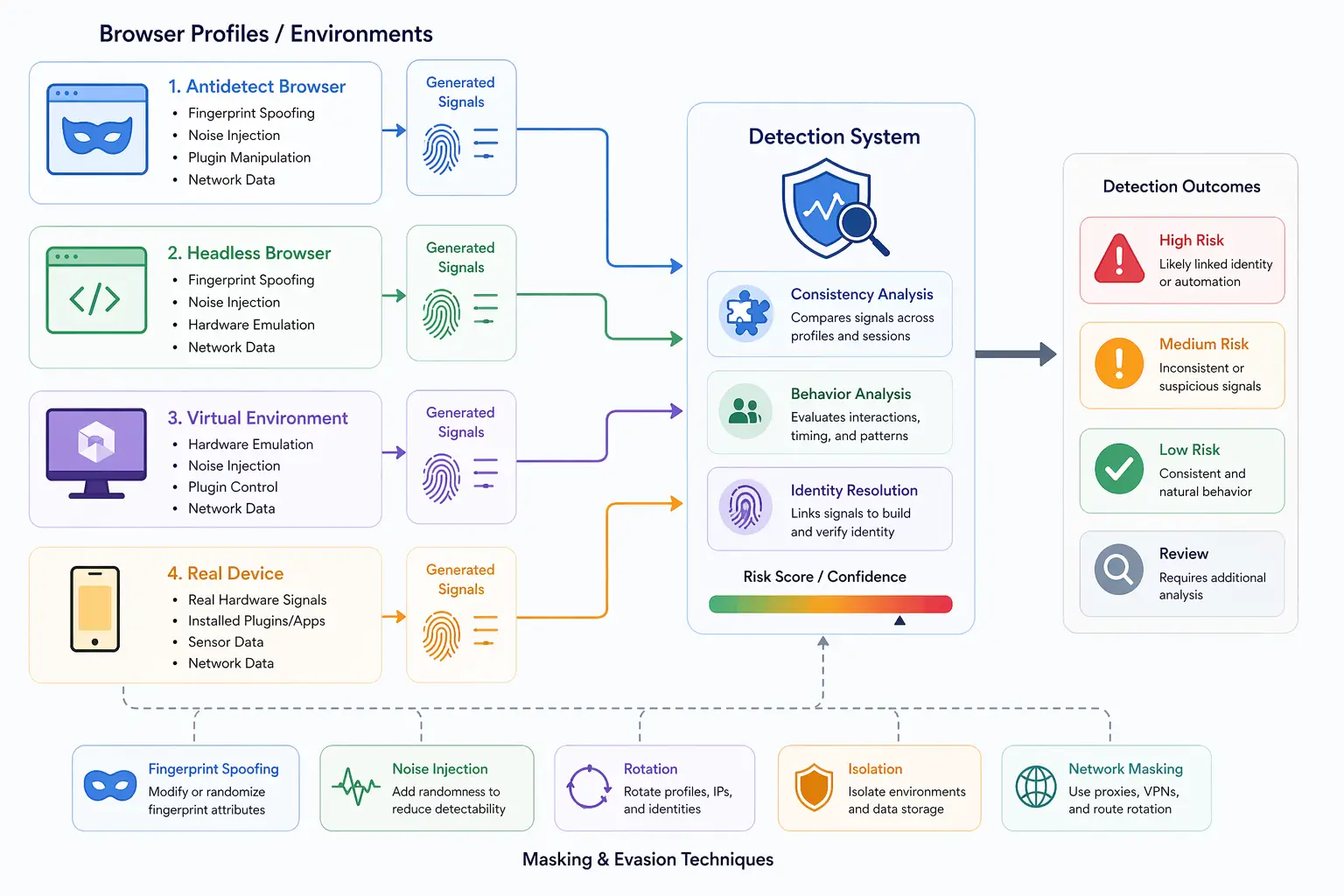
However, stealth plugins primarily operate at the browser level. They do not address deeper signals such as hardware behavior or network patterns.
Limitations of Stealth Plugins
While stealth plugins are useful, they have several limitations.
One limitation is that they focus on known detection signals. As detection systems evolve, new signals may emerge that are not covered by existing plugins.
Another limitation is inconsistency. Modifying values at runtime can lead to mismatches between different parts of the system.
There is also the issue of depth. Stealth plugins do not modify underlying hardware or system behavior, which can still reveal automation.
These limitations mean that stealth plugins are not a complete solution.
Stealth Plugins vs Browser Engine Modifications
Stealth plugins and browser engine modifications are often compared because they both aim to reduce detection.
Stealth plugins operate at runtime by overriding values, while engine modifications change how values are generated at the source.
Engine modifications offer deeper control but are more complex, while stealth plugins are easier to use but more limited in scope.
Stealth Plugins vs Antidetect Browsers
Stealth plugins and antidetect browsers serve similar goals but differ in approach.
Antidetect browsers provide profile management and fingerprint customization, while stealth plugins focus on masking automation signals within a single environment.
In many setups, stealth plugins are used alongside other tools to enhance effectiveness.
Stealth Plugins vs Real-Device Environments
A key distinction in modern detection systems is the difference between masking signals and using real environments.
Stealth plugins attempt to hide automation artifacts, but they do not change the underlying behavior of the system. This can lead to detectable inconsistencies.
Real-device approaches operate on actual hardware, where automation signals are naturally absent. Tools like Appilot follow this approach by running automation on real Android devices, ensuring that browser behavior aligns with genuine user environments without requiring extensive masking.
This reduces reliance on patching and improves overall consistency.
When Stealth Plugins Are Effective
Stealth plugins are most effective in scenarios where detection systems rely on basic checks and known automation signals.
They are useful for improving the reliability of automation workflows and reducing obvious detection triggers.
However, in environments with advanced detection systems, additional measures may be required to achieve realistic behavior.
Understanding when stealth plugins are sufficient helps determine their role in a broader setup.
Frequently Asked Questions
Q: What are stealth plugins?
They are tools that modify browser behavior to hide signals that indicate automation.
Q: How do stealth plugins work?
They intercept and alter browser APIs, remove automation flags, and adjust behavior to match real browsers.
Q: Are stealth plugins enough to avoid detection?
They help reduce detection risk but are not sufficient against advanced systems.
Q: Do stealth plugins work with all browsers?
They are typically designed for specific automation frameworks and browsers.
Q: What is the difference between stealth plugins and antidetect browsers?
Stealth plugins mask automation signals, while antidetect browsers manage multiple identities and fingerprints.
Q: How do real-device solutions compare?
Real-device solutions like Appilot operate on actual hardware, eliminating many automation signals instead of masking them.
Key Takeaways
Stealth plugins are tools designed to hide automation signals by modifying browser behavior at runtime, making automated environments appear more like real user sessions. They work by removing automation flags, adjusting JavaScript API outputs, and patching differences in headless browsers. While they are effective at addressing basic detection mechanisms, they have limitations in handling deeper signals such as hardware behavior and system-level consistency. As detection systems become more advanced, understanding the role of stealth plugins alongside other approaches becomes essential for maintaining realistic environments.