What Is an Antidetect Browser? Complete Overview

Most users think switching accounts or using a different browser is enough to stay anonymous online, but modern tracking systems go far beyond that. Websites today analyze dozens of signals, including device behavior, browser configuration, and network data, to identify users. This is where antidetect browsers come into play.
Understanding antidetect browsers is important because they are specifically designed to manage and manipulate these signals. They are widely used in industries that require multiple identities or controlled environments, but they also come with limitations that are often misunderstood. This guide explains what an antidetect browser is, how it works, and where it fits in real-world use.
What Is an Antidetect Browser?
An antidetect browser is a specialized browser designed to modify or mask fingerprinting signals so that multiple browsing profiles appear as different, unrelated users. Unlike standard browsers, which expose consistent system information, antidetect browsers allow users to customize attributes such as user agent, screen resolution, language, and more.
The goal is to create separate browser profiles, each with its own identity, so that websites cannot easily link them together. These profiles can simulate different devices, locations, and environments.
Antidetect browsers are commonly used in scenarios where managing multiple accounts is necessary, such as testing, marketing, or research workflows.
The Core Principle Behind Antidetect Browsers
The core principle behind antidetect browsers is that websites rely on consistency across signals to identify users. If multiple sessions share the same fingerprint, they can be linked together.
Antidetect browsers attempt to break this link by assigning unique fingerprints to each profile. This includes modifying browser-level signals and sometimes simulating different environments.
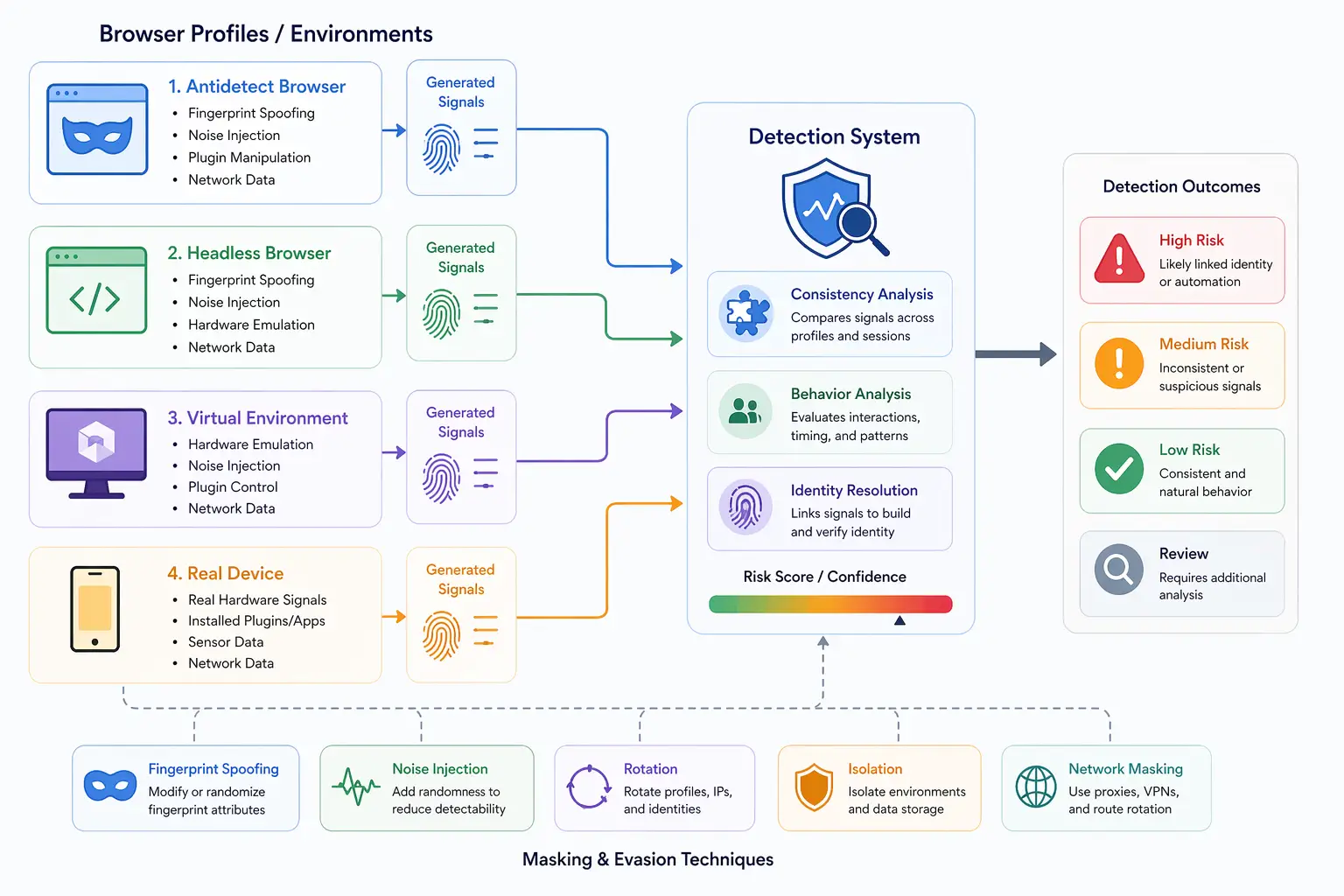
However, modern detection systems do not rely on a single signal. They analyze how all signals align with each other, which means simply changing a few attributes is often not enough.
How Antidetect Browsers Work
Antidetect browsers work by creating isolated profiles and allowing users to control the fingerprint of each profile.
Creating Separate Browser Profiles
Each profile in an antidetect browser acts like a separate user. It has its own cookies, storage, and configuration. This prevents data from being shared across profiles and helps maintain separation between identities.
These profiles can be launched independently, allowing users to manage multiple sessions at the same time.
Modifying Fingerprinting Signals
Antidetect browsers allow users to modify various fingerprinting signals such as user agent, screen resolution, timezone, language, and more. This helps create the appearance of different devices.
However, modifying these signals manually can lead to inconsistencies. For example, a mismatch between timezone and IP location can raise suspicion.
Managing Proxies and Network Identity
To further separate profiles, antidetect browsers are often used with proxies. This allows each profile to appear as if it is coming from a different location.
While this helps with network-level separation, it does not address deeper signals such as hardware behavior or rendering output.
Why Antidetect Browsers Are Used
Antidetect browsers are used in situations where managing multiple identities or avoiding linkage between sessions is important.
In testing environments, developers use them to simulate different user setups and ensure compatibility across devices. In marketing workflows, they are used to manage multiple accounts without triggering platform restrictions. In research and data collection, they help isolate sessions to prevent cross-contamination of results.
Despite these use cases, it is important to understand that antidetect browsers are not a guaranteed solution for avoiding detection.
Limitations of Antidetect Browsers
While antidetect browsers provide control over certain signals, they have several limitations that become more apparent with modern detection systems.
One major limitation is that they primarily focus on browser-level attributes. Many advanced detection systems analyze deeper signals such as hardware behavior, rendering consistency, and real-time interactions.
Another limitation is inconsistency. When signals are manually configured, it is easy to create combinations that do not exist in real-world devices. Detection systems are specifically designed to identify these mismatches.
There is also the challenge of scalability. Managing multiple profiles with consistent and realistic configurations becomes increasingly complex as the number of accounts grows.
Antidetect Browsers vs Real Device Environments
A key distinction in modern detection systems is the difference between simulated environments and real device environments.
Antidetect browsers simulate fingerprints by modifying browser-level signals, but they do not fully replicate how real devices behave. This can lead to detectable inconsistencies, especially in areas such as graphics rendering, hardware performance, and API behavior.
In contrast, real-device-based approaches operate on actual hardware, which naturally produces consistent signals across all layers. Tools like Appilot take this approach by running automation on real Android devices, ensuring that browser behavior, hardware signals, and system configurations align naturally rather than being artificially constructed.
This difference becomes critical in environments where detection systems analyze multiple layers simultaneously.
Common Misconceptions About Antidetect Browsers
There are several misconceptions about antidetect browsers that can lead to unrealistic expectations.
One common belief is that antidetect browsers make users completely anonymous, but in reality, they only modify certain signals and do not eliminate tracking entirely.
Another misconception is that changing more attributes improves anonymity. In practice, adding too many modifications can create unrealistic combinations that are easier to detect.
There is also a belief that antidetect browsers work independently, but they are often combined with proxies and other tools to create a more complete setup.
The Technical Perspective
From a technical perspective, antidetect browsers operate by intercepting and modifying browser APIs and request data. They adjust values returned by JavaScript APIs and alter headers sent to servers.
While this provides flexibility, it also introduces risk. Detection systems can compare declared values with actual behavior to identify inconsistencies.
This is why modern tracking systems rely on multiple layers of analysis, making it increasingly difficult for purely simulated environments to remain undetected.
When Antidetect Browsers Make Sense
Antidetect browsers are useful in scenarios where basic separation of sessions is sufficient and where detection systems are less advanced.
They can be effective for testing environments, simple account management, and controlled research workflows. However, for more complex use cases that involve advanced detection systems, additional approaches may be required.
Understanding their strengths and limitations helps determine when they are appropriate to use.
Frequently Asked Questions
Q: What is an antidetect browser used for?
It is used to manage multiple browser profiles and prevent them from being linked together by tracking systems.
Q: How do antidetect browsers work?
They work by modifying fingerprinting signals and isolating browsing sessions into separate profiles.
Q: Are antidetect browsers completely anonymous?
No, they reduce linkage between profiles but do not eliminate tracking entirely.
Q: Do antidetect browsers prevent fingerprinting?
They attempt to modify fingerprinting signals, but advanced systems can still detect inconsistencies.
Q: Are antidetect browsers better than proxies?
They serve different purposes. Proxies change network identity, while antidetect browsers modify browser-level signals.
Q: How do antidetect browsers compare to real-device solutions?
Antidetect browsers simulate environments, while real-device solutions like Appilot use actual hardware, which produces more consistent and realistic signals.
Key Takeaways
Antidetect browsers are tools designed to create multiple browser identities by modifying fingerprinting signals and isolating profiles. They are useful for managing multiple sessions and simulating different environments, but they primarily operate at the browser level and have limitations when facing advanced detection systems. As tracking evolves to include deeper signals such as hardware behavior and real-time interactions, relying solely on simulated fingerprints becomes less effective, making it important to understand where antidetect browsers fit within the broader landscape of tracking and detection.