Why You Can’t Run More Than 20 Profiles Simultaneously (And How to Fix It)

You start with a few browser profiles, everything runs smoothly, and it feels like your system can easily handle the workload, so naturally you push further, adding more profiles, opening more sessions, and increasing activity, expecting things to scale linearly with your effort.
Then somewhere around fifteen, maybe twenty profiles, everything begins to slow down in a way that feels disproportionate, tabs become unresponsive, actions lag, CPU spikes unpredictably, and eventually the system either freezes, crashes, or starts behaving so inconsistently that you cannot rely on it anymore.
What makes this situation frustrating is that you might already be using a decent machine, with enough RAM and a modern processor, and yet you still hit the same invisible ceiling, no matter how many tweaks you apply, whether that is closing background apps, upgrading hardware, or switching browsers.
It begins to feel like there is a hard limit you cannot break, and every attempt to push past it results in instability, wasted time, and sometimes even account issues due to incomplete or failed actions.
You are not alone in this, and more importantly, this is not just a hardware limitation, because the reason you cannot run more than twenty profiles simultaneously is rooted in how browser environments, operating systems, and platform detection systems interact with each other.
Once you understand what is actually happening behind the scenes, you can break past this limit in a way that is stable, scalable, and far more efficient than simply trying to push your current setup harder.
Why You Keep Hitting the 20 Profile Limit
Most people assume this limit is caused by insufficient RAM or CPU power, but the real issue is a combination of resource saturation, architectural bottlenecks, and environmental conflicts that compound as you add more profiles.
Browser Profiles Are Not Lightweight
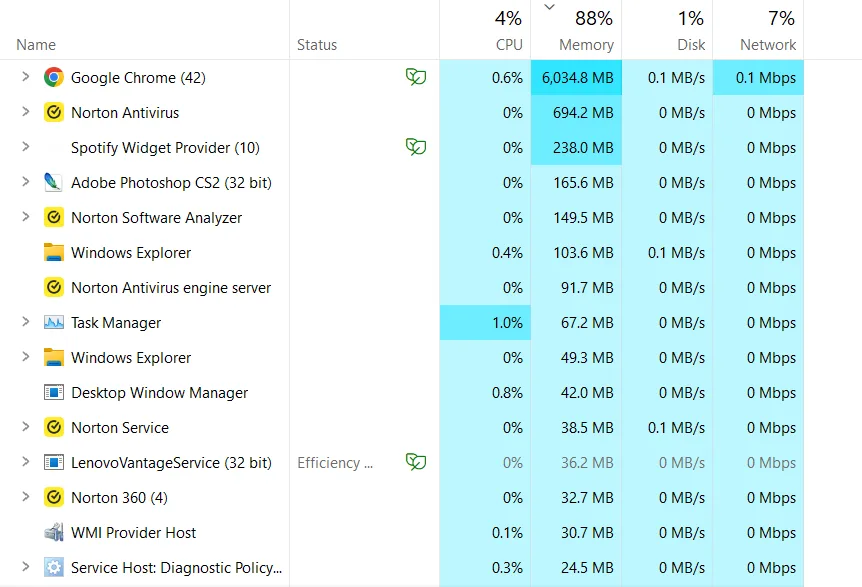
Each browser profile is essentially a separate environment, running its own processes, memory space, and background tasks, which means that even if a single profile appears lightweight, running twenty of them simultaneously creates a massive cumulative load.
Modern browsers are not optimized for this type of usage, because they are designed for individual users, not for running dozens of isolated environments at scale.
CPU Thread Contention Becomes a Bottleneck
Even if your CPU has multiple cores, running many profiles creates contention between threads, where processes compete for execution time, causing delays and inefficiencies that are not immediately visible in basic usage metrics.
This leads to situations where your system appears to have available resources, but performance still degrades because tasks are waiting on each other.
RAM Fragmentation and Disk Swapping
As memory usage increases, your system starts using disk space as virtual memory, which is significantly slower than RAM, and this transition often happens gradually, making it difficult to pinpoint exactly when performance starts degrading.
Once disk swapping begins, everything slows down dramatically, and adding more profiles only makes the problem worse.
Shared Environment Limitations
Running all profiles within the same operating system environment creates hidden dependencies and conflicts, where one profile’s activity can influence others, leading to instability and unpredictable behavior.
This is especially problematic when profiles are used for automation or multi-account management, where isolation is critical.
The Hidden Cost of This Limitation
At first, the inability to run more than twenty profiles might seem like a minor inconvenience, but over time it becomes a major bottleneck that limits your ability to scale.
You spend more time managing profiles than actually using them, constantly opening and closing sessions, prioritizing tasks, and dealing with slowdowns that interrupt your workflow.
This directly impacts productivity, reduces throughput, and prevents you from taking on more work, whether that is managing additional accounts, running more campaigns, or expanding your operations.
More importantly, it creates a ceiling that feels impossible to break, keeping you stuck at a level far below your actual capacity.
The Complete Solution: How to Run More Than 20 Profiles Without Crashing
Breaking past this limit requires a shift in how you think about running profiles, because the solution is not to optimize your current setup further, but to redesign it so that it is not constrained by a single system.
The first step is to stop treating your computer as the execution engine for all profiles, because no matter how powerful your machine is, it will always have a limit.
Instead, your computer should act as a control center, while the actual execution is distributed across multiple environments.
This is where mobile-based automation becomes a powerful alternative, because instead of running dozens of browser profiles on one machine, you run workflows on real devices, each operating independently.
A practical way to implement this is through a platform like Appilot, which allows you to execute automation directly on Android devices, removing the need to maintain heavy browser profiles on your computer.
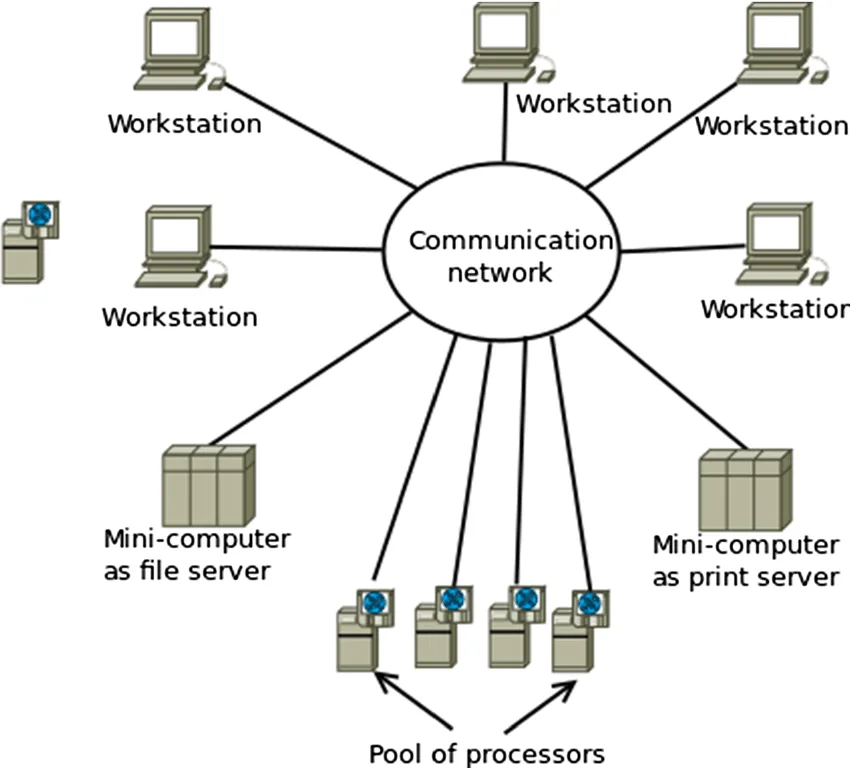
By distributing execution across multiple devices, you eliminate the central bottleneck entirely, because each device handles its own workload, and your system no longer struggles under the weight of dozens of profiles.
This not only improves performance but also enhances stability, because failures in one environment do not affect others.
Once this structure is in place, the next step is optimizing how tasks are distributed, ensuring that workloads are balanced and that no single environment becomes overloaded.
Monitoring plays a crucial role here, allowing you to track performance and make adjustments as needed to maintain efficiency.
How to Prevent Profile Limits From Holding You Back Again
Prevention is about designing systems that are inherently scalable, rather than trying to extend the limits of a single machine.
By maintaining separation between workflows and ensuring that each operates in its own environment, you avoid the conflicts and bottlenecks that cause performance issues.
Regular monitoring helps you identify when you are approaching capacity, allowing you to scale proactively rather than reactively.
Common Mistakes That Make This Problem Worse
One of the most common mistakes is trying to push more profiles onto the same system by upgrading hardware, which only delays the problem without solving it.
Another is switching browsers or profile managers without addressing the underlying limitation, because while this might temporarily improve performance, the same bottleneck will eventually reappear.
There is also a tendency to ignore early signs of slowdown, which often indicate that the system is approaching its limit and needs to be restructured.
Real Success Stories: Before and After
A user managing multiple accounts found that their system consistently slowed down and crashed when running more than twenty profiles, forcing them to limit their operations and manually manage sessions.
After transitioning to a distributed setup using Appilot, they were able to scale beyond fifty active workflows without performance issues, significantly increasing productivity and reducing system instability.
Another example involved a team running automation campaigns, where profile limits prevented them from scaling, but after restructuring their setup, they were able to handle a much larger workload without additional hardware.
Frequently Asked Questions
One common question is whether upgrading RAM or CPU can solve the problem, and while it can increase the limit slightly, it does not eliminate the fundamental bottleneck of running everything on a single system.
Another question is whether there is a specific number of profiles that any system can handle, and the answer varies depending on workload and configuration, but every system has a limit, and exceeding it will always lead to performance degradation.
There is also the question of whether distributed automation is complex to set up, and while it requires a different approach, platforms like Appilot simplify the process significantly by handling the infrastructure.
Conclusion: Breaking the 20 Profile Barrier
The reason you cannot run more than twenty profiles simultaneously is not because your system is weak, but because it is being used in a way that it was never designed for.
Once you shift from a centralized approach to a distributed one, the limitation disappears, and you gain the ability to scale far beyond what a single machine could handle.
If you are hitting this limit right now, the solution is not to push harder, but to rethink your architecture, because once you do, you will not just break the barrier, you will remove it entirely.