Why Your Automation Runs Slower Than Manual Work
Automation Was Supposed To Save Time
One of the biggest reasons people invest in automation is because they expect it to be faster than manual work. The goal is usually simple. Save time, remove repetitive tasks, scale operations, and stop wasting hours clicking through the same process every day.
Then eventually something strange happens.
The manual version feels faster.
A human can finish the task in ten minutes while the automation takes twenty. Browser profiles take forever to launch, workflows keep waiting unnecessarily, pages refresh too often, and scripts spend more time recovering from errors than actually doing useful work.
That is one of the most frustrating problems in automation because the system is technically working, but it is not creating the speed you expected.
The issue is usually not that automation itself is slow. The problem is that most workflows are built inefficiently.
Why Browser Automation Often Feels Slow
Browser automation is usually slower than manual work because it is trying to be more careful than a human.
A person can instantly recognize what is on the screen, ignore unnecessary elements, and adapt when something changes. Automation has to check every step.
The workflow waits for pages to load, checks whether buttons exist, waits for popups to disappear, verifies logins, confirms actions, and retries when something goes wrong.
That extra caution is necessary because without it the workflow becomes unreliable.
The problem starts when the automation becomes too cautious.
If the script waits ten seconds after every action, refreshes pages unnecessarily, or keeps repeating checks that are no longer needed, the workflow becomes very slow.
This becomes even worse when you run automation across large numbers of browser profiles, proxies, or Android devices.
The Biggest Mistake: Using Fixed Waits Everywhere
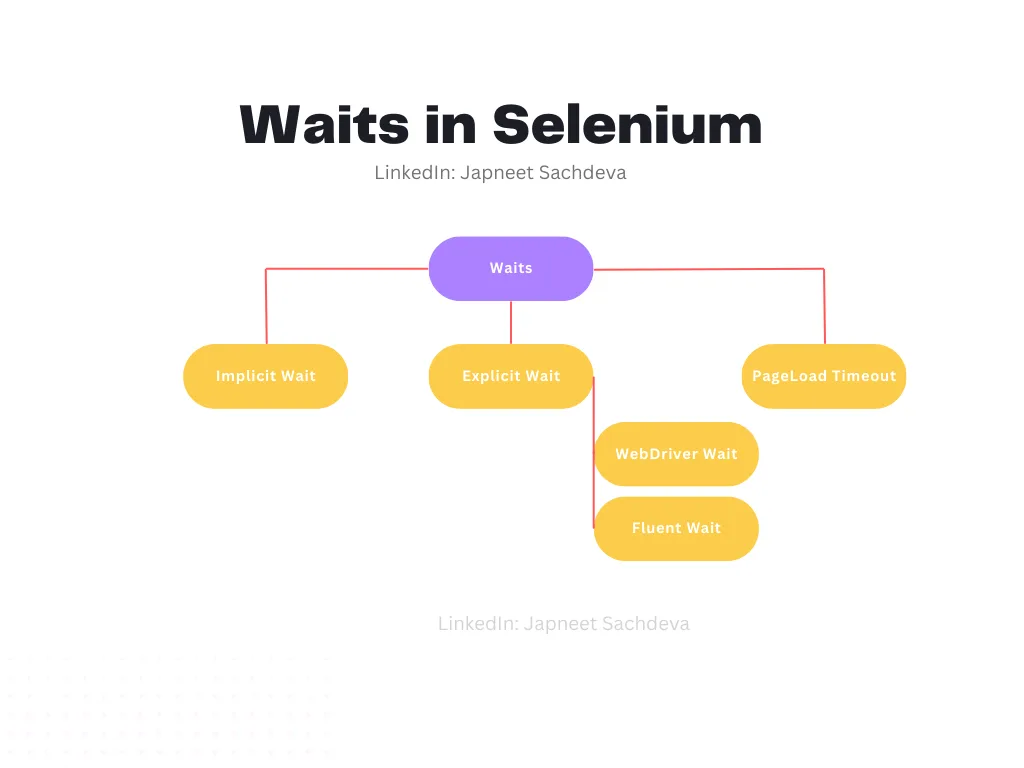
One of the biggest reasons automation becomes slower than manual work is because people use fixed waits for everything.
For example, the script may wait five seconds after clicking a button, ten seconds after opening a page, and three seconds after every form submission.
That may seem safe, but it creates a lot of wasted time.
If the page loads in two seconds, waiting ten seconds means eight seconds were wasted. If the button appears immediately, waiting five seconds before clicking it only slows the workflow down.
Those delays become massive at scale.
If a workflow has ten unnecessary waits and runs across one hundred accounts, the wasted time can become hours.
The stronger approach is using condition-based waits instead of fixed waits. Instead of waiting a specific amount of time, the automation should move forward as soon as the required element appears or the action completes.
Why Too Many Recovery Steps Create More Delay
Another common reason automation feels slow is because the workflow is overloaded with recovery logic.
For example, the script may refresh the page too often, restart the browser too quickly, retry actions too many times, or keep checking for problems that rarely happen.
Recovery logic is important, but too much of it creates unnecessary delays.
If the system retries every action three times before moving on, even when nothing is wrong, the workflow becomes much slower than it needs to be.
The goal should be balancing reliability with speed.
You want enough recovery logic to handle problems, but not so much that the workflow spends more time preparing for failure than actually doing the task.
Why Weak Infrastructure Makes Everything Worse
Sometimes the automation itself is not the problem.
The real issue is weak infrastructure.
Slow proxies, overloaded servers, heavy browser profiles, too many extensions, low RAM, poor internet connections, and weak CPUs can all make automation much slower.
This is especially common when running large numbers of browser profiles at once.
A browser profile with years of cookies, large storage files, dozens of tabs, and multiple extensions will usually take much longer to launch than a clean profile.
The same applies to proxies. A slow proxy can make every page load more slowly, which affects the entire workflow.
That is why optimizing the environment is just as important as optimizing the script.
Why Centralization Makes This Easier
Slow workflows become much harder to diagnose when browser profiles, proxies, Android devices, schedules, logs, and performance reports are spread across different systems. You may have one platform for browser automation, another for proxies, another for logs, and another for scheduling. That makes it difficult to see which part of the workflow is actually causing the delay.
This is one of the reasons Appilot becomes useful when automation starts scaling. Instead of keeping browser profiles, Android workflows, proxy notes, task history, schedules, and performance tracking spread across multiple systems, everything can stay visible from one dashboard. That makes it easier to compare browser speed, monitor task duration, identify bottlenecks, and see which workflows need optimization.
Conclusion: Slow Automation Usually Comes From Inefficient Workflows
If your automation feels slower than manual work, the issue is usually not that automation itself is inherently slow. The problem is that the workflow has too many fixed waits, too many unnecessary retries, too much recovery logic, or weak infrastructure underneath it.
Once you use condition-based waits, optimize browser profiles, improve proxies, and remove unnecessary delays, automation becomes much faster and more reliable. That is what allows you to save time instead of creating a slower version of the same work.