Why Your Containerized Browsers Can’t Access the Internet (And How to Fix It)
You built your automation workflow using Puppeteer, Playwright, or Selenium, and everything worked perfectly on your local machine. Requests loaded, pages rendered, scripts executed exactly as expected.
Then you moved it into a container.
Suddenly, nothing works the same way. Your browser launches, but pages never load. Requests hang indefinitely or fail with vague network errors. Sometimes you see DNS resolution failures, other times connection timeouts, and occasionally everything appears to work—but only intermittently.
You double-check your code. You verify your scripts. You even test the same URLs manually, and they load fine. But inside the container, your browser behaves as if the internet simply does not exist.
What makes this worse is that containerization is supposed to simplify deployment. Instead, it introduces a layer of networking complexity that is not immediately visible, and most debugging attempts only scratch the surface.
You’re not alone in this. This is one of the most common failure points when moving browser automation into Docker-based environments, and the root causes are rarely obvious until you understand how container networking actually works.
The good news is that this problem is not random, and once you understand why it happens, you can fix it systematically and prevent it from coming back.
Why Your Containerized Browsers Can’t Access the Internet
Most people assume this issue is caused by a simple misconfiguration, but in reality, it is usually the result of multiple subtle problems interacting at once.
DNS resolution failures inside containers
Containers rely on their own DNS configuration, which is often different from the host machine. When your browser tries to resolve a domain, it depends on the container’s DNS settings, not your system’s.
If the DNS server is misconfigured, slow, or blocked, your requests will fail before they even reach the internet. This is why you might see errors like “ERR_NAME_NOT_RESOLVED” or experience long delays before timeouts.
Network isolation by design
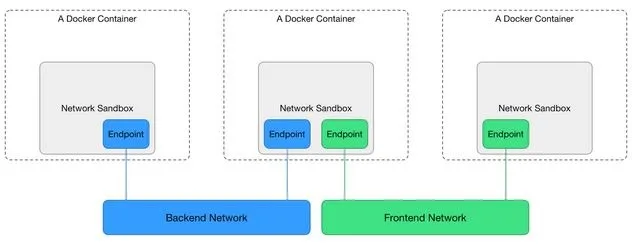
Containers are isolated environments. By default, they operate within their own network namespace, which means they do not share the same network stack as your host machine.
This isolation is intentional, but it also means that outbound connections depend entirely on how the container network is configured. If the bridge network is misconfigured or restricted, your browser cannot reach external servers.
Missing or misconfigured proxy settings
In many environments, especially corporate or cloud setups, outbound traffic must pass through a proxy. Your local machine might already be configured for this, but your container is not.
When your browser runs inside the container without proper proxy configuration, requests fail silently or get blocked entirely.
Firewall and security restrictions
Host-level firewalls, cloud security groups, or container runtime policies can block outbound traffic without obvious error messages. This creates a situation where everything appears correct, but requests never leave the container.
Browser-level sandbox restrictions
Modern browsers running inside containers often require specific flags to function correctly. Without proper configuration, sandboxing features can interfere with networking or prevent the browser from establishing connections.
The Hidden Cost of Ignoring This Problem
At first, this issue might seem like a temporary inconvenience. You assume it is a small configuration bug that will be fixed quickly. But as you continue working, the impact becomes more significant.
You start adding workarounds without fully understanding the problem. You tweak network settings, restart containers, and experiment with different configurations, but the issue keeps resurfacing in slightly different forms.
This leads to fragile setups where your automation only works under specific conditions. A small change in environment, infrastructure, or deployment can break everything again.
There is also a significant time cost. Debugging networking issues in containers is notoriously difficult because errors are often indirect. Instead of clear failure messages, you get timeouts, partial loads, or inconsistent behavior.
More importantly, this problem blocks scalability. If your containers cannot reliably access the internet, you cannot deploy automation at scale, which defeats the entire purpose of containerization.
The Complete Fix: How to Restore Internet Access Inside Containers
Fixing this issue requires addressing each layer of the problem rather than applying random fixes.
Step 1: Verify basic connectivity inside the container
Start by confirming whether the container itself can access the internet. Run simple commands like curl or ping inside the container to test connectivity. If these fail, the issue is at the network level, not your browser.
If basic connectivity works but your browser still fails, the issue is likely within your automation setup.
Step 2: Fix DNS configuration
Ensure that your container is using reliable DNS servers. You can explicitly define DNS settings in your container configuration to avoid relying on default values that may not work in your environment.
Consistent DNS resolution is critical because every request depends on it.
Step 3: Check network mode and bridge configuration
Containers typically use a bridge network, but misconfiguration here can block outbound traffic. In some cases, switching network modes or properly configuring the bridge resolves connectivity issues immediately.
The key is to ensure that the container has a clear path to external networks.
Step 4: Configure proxies if required
If your environment requires a proxy, you must configure it explicitly inside the container. This includes setting environment variables and ensuring your browser automation tool respects those settings.
Without this step, requests may never reach their destination.
Step 5: Adjust browser launch parameters
When running browsers inside containers, certain flags are often required to ensure proper operation. For example, disabling sandboxing or adjusting shared memory usage can resolve issues that indirectly affect networking.
Why These Fixes Often Don’t Hold at Scale
Even after applying all the correct fixes, many teams find that the problem returns when they scale their setup. This is because containerized browser automation introduces complexity that grows with each additional instance.
Every container becomes another environment to configure, monitor, and maintain. Small inconsistencies between containers can lead to unpredictable behavior, especially when combined with network variability.
As you scale, you are not just solving a networking problem—you are managing a distributed system with multiple points of failure.
The Alternative: Stop Fighting Container Networking Altogether
At this point, it becomes clear that the issue is not just configuration—it is architectural.
Containerized browsers are powerful, but they require careful management of networking, environment consistency, and resource allocation. This creates a constant maintenance burden that increases as you scale.
A different approach is to move away from container-based browser automation and use environments where networking is already stable and aligned with real-world usage.
Instead of running browsers inside isolated containers, you run automation directly on real Android environments. These environments already have native network configurations, proper DNS resolution, and real-world behavior, which eliminates many of the issues you encounter in containers.
This is exactly the problem that led to the development of Appilot. Instead of configuring networking for each container, you run automation workflows on real devices through a centralized system, where connectivity is inherently stable.
The key difference is that you are no longer debugging infrastructure. You are focusing on automation itself.

How to Prevent This Problem From Coming Back
Once you fix your current setup, prevention becomes the priority.
You need to standardize your container configurations so that every instance behaves consistently. This includes defining network settings explicitly, using reliable DNS servers, and ensuring that environment variables are properly set.
Monitoring is also essential. Instead of waiting for failures, you should track connectivity metrics and detect issues early.
However, the most effective prevention strategy is to reduce reliance on complex container networking altogether. The fewer layers you have to manage, the fewer things can go wrong.
Common Mistakes That Make This Worse
One of the most common mistakes is assuming that the problem is within the automation code rather than the environment. This leads to unnecessary changes in scripts that do not address the root cause.
Another mistake is applying fixes blindly, such as switching network modes or adding flags without understanding their impact. This can temporarily resolve issues while introducing new ones.
There is also a tendency to ignore infrastructure consistency. Even small differences between containers can create hard-to-debug problems that only appear under specific conditions.
Conclusion: It’s Not Your Code—It’s the Environment
When your containerized browsers cannot access the internet, it is easy to assume something is broken in your automation logic. In reality, the issue almost always lies in the interaction between container networking, DNS configuration, and environment isolation.
Once you understand this, the problem becomes much more manageable. You can fix it systematically instead of relying on trial and error.
At the same time, it is important to recognize the limitations of container-based browser automation. As you scale, these issues become more frequent and more complex.
If your goal is to build reliable automation systems that do not require constant debugging, the most effective solution is to adopt an approach where networking and environment consistency are built in from the start.
That shift is what ultimately separates fragile setups from systems that actually scale.