Why Your Export Data Is Always Incomplete (And How to Fix It for Good)

You Export the Data… And Something Is Missing
You run the export expecting a complete dataset, but when you open the file, something feels off. Rows are missing, certain fields are empty, or the numbers do not match what you saw inside the platform.
At first, it seems like a small glitch, maybe a loading issue or a temporary bug, so you try again, refresh, and export once more. The result is slightly different, but still incomplete. Now it is no longer a one-time issue, it is a pattern.
This is where things get frustrating. You cannot rely on the data you are exporting, which means any reporting, analysis, or decision-making built on top of it becomes questionable.
The problem is not the export itself. It is the system behind how that data is being generated and retrieved.
Why Your Exported Data Is Incomplete
Most people assume incomplete exports are caused by tool limitations, but the real issue is usually a combination of how data is structured, retrieved, and processed.
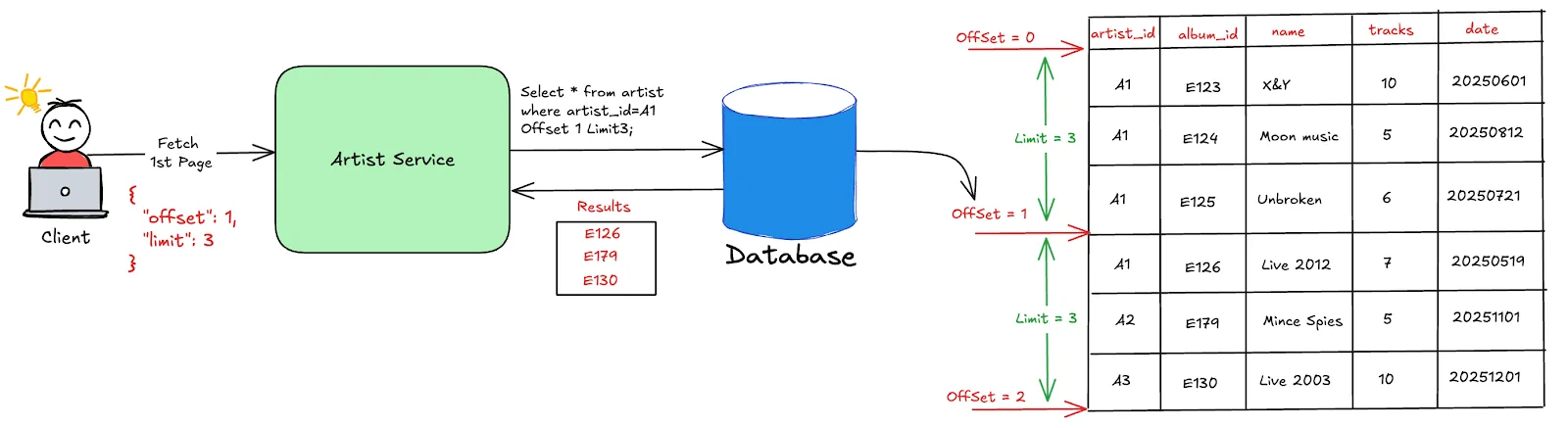
The first cause is pagination limits. Many platforms do not export all data in one go, especially when dealing with large datasets. Instead, they return partial results unless additional requests are made.
The second cause is asynchronous loading. Data that appears complete in the interface may still be loading behind the scenes, which means exporting too early captures only part of the dataset.
The third cause is API constraints. When exports rely on APIs, there are often rate limits, filtering rules, or caps that prevent full data retrieval.
The fourth cause is inconsistent execution. If exports are triggered from different environments, sessions, or conditions, the results can vary each time.
The Hidden Cost of Incomplete Data
Incomplete data is more than just an inconvenience, it directly affects the reliability of your work.
Decisions based on partial data can lead to incorrect conclusions, which impacts strategy and performance.
Client reporting becomes risky because the numbers you present may not reflect the full picture, reducing confidence in your work.
There is also a time cost. You spend additional effort verifying data, re-exporting, and trying to reconcile differences instead of focusing on analysis.
Over time, this creates friction in your workflow and reduces the effectiveness of your data-driven processes.
The Real Problem: Your Data Retrieval Is Not Structured
The core issue is not the export feature itself, but the lack of a structured system for retrieving data.
When data is pulled inconsistently, across different sessions, timings, or environments, the results will naturally vary.
This makes exports unreliable because the process generating them is not controlled.
What you need is not just a better export button, but a consistent way to retrieve data every time.
The Complete Solution: Standardize Data Retrieval and Execution
The only way to ensure complete exports is to control how data is generated and retrieved.
The first step is stabilizing timing. Exports should only occur when data is fully loaded and consistent, avoiding partial retrieval.
The second step is handling pagination and limits properly. Instead of relying on a single export action, you ensure that all data segments are retrieved systematically.
The third step is standardizing execution environments. When exports are triggered from a consistent setup, variability in results decreases.
This is where many teams struggle, because managing consistent data retrieval across multiple platforms and accounts requires coordination and reliable execution layers.
This is also where tools like Appilot become relevant.
Instead of triggering exports from scattered environments, Appilot allows workflows to run on real devices within a centralized system, which helps maintain consistency in how data is accessed and retrieved. This reduces variability and increases the reliability of exported data.
You could attempt to manage this manually with scripts and tools, but maintaining consistency at scale becomes complex. Appilot simplifies this by ensuring that execution happens under controlled conditions.
The key shift is moving from ad hoc exports to structured data retrieval.
Why Consistency Ensures Complete Data
Once data retrieval is standardized, exports become reliable.
All segments of data are captured because the process accounts for limits and loading behavior.
Results become consistent because they are generated under the same conditions each time.
Reporting becomes more accurate because you are working with complete datasets.
Most importantly, you can trust your data again.
How to Prevent This From Happening Again
Ensuring complete data is not a one-time fix, it requires maintaining consistency over time.
You ensure that all exports follow the same structured process, avoiding variation.
You monitor data outputs regularly to detect gaps early.
You refine your workflows as platforms and data structures evolve.
Common Mistakes That Make This Worse
One of the most common mistakes is relying on single-click exports without considering platform limitations.
Another mistake is exporting data from inconsistent environments, which introduces variability.
Some teams attempt to fix incomplete data by re-exporting repeatedly instead of addressing the root cause.
The most critical mistake is assuming that incomplete exports are unavoidable, when they are often a result of how the process is structured.
Conclusion: Incomplete Data Is a Process Issue, Not a Tool Issue
If your exported data is always incomplete, it is not because your tools are broken, it is because your data retrieval process is inconsistent.
Once you standardize how data is accessed, handle platform limitations properly, and execute exports in controlled environments, the problem disappears.
You can continue trying to fix this manually, but as your data grows, the complexity will grow with it.
At some point, you either build a system that ensures complete data retrieval or use one that already does.
That is where platforms like Appilot fit in, not as a data tool, but as a way to create consistent execution environments that make your exports reliable and complete.