Why Your Headless Browser Is Easy to Detect

It runs flawlessly—until the site shuts you down
Your automation works locally.
CI is green.
Selectors resolve.
Then production hits.
Instead of getting obvious errors, you start seeing silent blocks, challenge pages, 403 responses, partial data, or endless retries.
Analytics eventually show the truth.
Your headless browser triggered a detection signal that tripped a defense layer you never saw.
This is not usually a simple misconfiguration.
It is the modern web doing exactly what it was designed to do by identifying non-human execution environments.
Headless browsers are one of the easiest targets.
Why Headless Browser Detection Is Everywhere Now
Headless browsers made automation easier, but they also made detection easier.
Most production websites now run layered checks that explicitly test for headless execution artifacts, fingerprint inconsistencies, behavioural anomalies, and network-level patterns.
This affects web scrapers, QA automation, growth bots, account workflows, and monitoring systems.
If headless mode works locally but fails in the cloud, CAPTCHAs appear only in headless mode, or content loads but important data is withheld, then you are probably hitting headless-browser detection rather than simple rate limits.
How Headless Browser Detection Actually Works
Detection is not a single check.
It is layered correlation.
1. Obvious Headless Flags
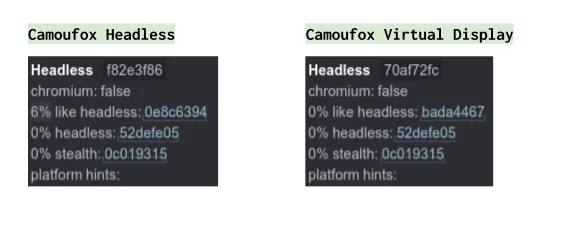
Basic checks include values such as navigator.webdriver, missing browser plugins, empty extension lists, default headless user agents, and headless-specific window properties.
Stealth plugins can patch some of these issues, but this layer is only the first filter.
It is relatively simple compared to what comes later.
2. Fingerprint Inconsistencies
Modern headless-browser fingerprint analysis compares dozens of signals including canvas rendering output, WebGL vendor and renderer values, AudioContext output, installed fonts, screen resolution, timezone versus locale, device memory, and hardware concurrency.
Headless Chrome often produces signal combinations that never appear in real user environments, mismatch system-level signals, or remain overly uniform across sessions.
Each mismatch increases detection confidence.
This is why one site may allow a headless browser while another flags it instantly.
3. Behavioral Detection
Even with patched fingerprints, behaviour still exposes automation.
Headless bots often click at exact intervals, scroll instantly, never hesitate, never misclick, and never change pace.
Real humans pause unpredictably, scroll in bursts, change direction, and hesitate before actions.
Behavioural detection has become one of the strongest headless-detection signals and is extremely difficult to fake consistently at scale.
4. TLS & Network-Level Fingerprints
Advanced systems also fingerprint TLS handshake signatures, cipher-suite ordering, HTTP/2 frame patterns, header sequencing, and connection reuse behaviour.
These operate below the JavaScript layer.
They cannot be fixed with DOM patches.
This is why headless-browser detection can still work even after heavy stealth modifications.
Why Common “Anti-Detection” Fixes Fail
Many common fixes only delay detection rather than eliminate it.
“Just Use a Stealth Plugin”
Stealth plugins fix basic JavaScript flags and simple property checks.
They do not fix TLS fingerprints, behavioural realism, or cross-session consistency.
The result is usually delayed detection rather than real protection.
“Switch Frameworks”
Switching between tools such as entity["software","Puppeteer","Browser automation library"], entity["software","Playwright","Browser automation framework"], or entity["software","Selenium","Browser automation framework"] changes APIs, but it does not fundamentally change the execution surface.
“Disable Headless Mode”
Running a browser in headed mode inside a cloud virtual machine still often uses virtual displays, lacks real GPU noise, and runs in synthetic containers.
The detection pressure simply moves to fingerprint and behaviour layers.
The Core Problem: Execution Environment Mismatch
Websites do not usually detect the script itself.
They detect the environment where it runs.
Headless environments often lack organic GPU-rendering variance, genuine input-device noise, natural session history, and real user entropy.
The challenge is not patching a bug.
The challenge is trying to fake an environment.
Two Practical Ways to Reduce Headless Detection
1. High-Fidelity Browser Automation
This approach requires full browser execution, fingerprint coherence, persistent sessions, behavioural modelling, and continuous maintenance.
It can work, but it is expensive, fragile, and requires ongoing tuning.
Most headless mitigation efforts stall here.
2. Change the Automation Surface
Detection systems are strongest against desktop browser traffic, synthetic environments, and stateless automation.
They are generally less aggressive toward real mobile traffic, more tolerant of mobile behaviour variance, and more cautious about false positives inside applications.
Instead of fighting browser detection directly, some teams move workflows to native mobile execution.
Platforms like Appilot fit naturally here.
Appilot runs automation on real Android devices using native applications instead of headless browsers.
This avoids headless fingerprints, browser-level heuristics, and many DOM-based detection traps.
However, this does not make automation invisible.
It simply changes the execution surface.
Prevention: Avoid Detection Before It Starts
Fixing detection after a workflow has already been flagged is much harder than preventing it in the first place.
Prevention is an architectural problem.
1. Maintain Persistent Session Identity
Headless bots often restart clean instances repeatedly.
Real users do not.
It is important to persist cookies, LocalStorage, realistic session lifetimes, and gradual activity buildup.
Stateless automation gets flagged much faster.
2. Avoid Uniform Patterns
Detection systems are very good at spotting repetition.
Adding timing variance, navigation variance, context switching, and irregular pauses can make behaviour less uniform.
Uniform execution is one of the strongest detection signals.
3. Ensure Fingerprint Consistency
Random fingerprints are often worse than stable ones.
It is better to maintain a stable timezone, locale, hardware profile, and environment for each session.
Consistency matters more than randomness.
4. Reduce Environment Volatility
Disposable containers often leak synthetic patterns and constantly reset entropy.
Stable execution contexts, long-lived environments, and controlled lifecycle management generally perform better.
5. Use Realistic Execution Surfaces
Headless-browser environments inherently lack true hardware signals, real input devices, and organic GPU behaviour.
Some teams reduce detection pressure by moving sensitive workflows to real-device environments.
Platforms like Appilot help by running automation on real Android devices where device signals are authentic, interaction patterns align more closely with real behaviour, and session identity persists more naturally.
This does not eliminate detection, but it reduces reliance on fragile headless-browser patches.
Step-by-Step: Reducing Headless Detection
Step 1: Identify Which Layer Flags You
It is important to determine whether the issue comes from JavaScript property checks, behavioural scoring, TLS fingerprints, or something else.
Instrument the system before guessing.
Step 2: Stop Perfect Automation
Adding scroll jitter, variable pauses, occasional idle time, and context shifts can make behaviour less predictable.
Behaviour matters more than simple flags.
Step 3: Reduce Fingerprint Reuse
Never reuse identical canvas noise, WebGL output, or header ordering across sessions.
Uniformity accelerates detection.
Step 4: Rethink Where Automation Runs
If browser-based automation continues failing, it may be worth evaluating mobile equivalents, native application flows, or real-device execution.
Sometimes the best way to reduce headless-browser detection is to stop relying on headless browsers.
Real Example
A team running price monitoring passed all local tests but repeatedly failed in production.
They tried stealth plugins, proxy rotation, and switching frameworks.
What finally worked was reducing uniform behaviour, persisting sessions, removing headless mode from sensitive flows, and moving critical paths away from desktop browsers.
Detection dropped and stability improved.
The lesson is simple.
Detection pressure follows the execution surface.
Common Mistakes
One of the most common mistakes is scaling before stabilising.
If a single instance is already detectable, scaling only multiplies the problem.
Another mistake is treating detection as a bug rather than a policy.
There is also no permanent “undetectable” switch for headless browsers.
Long-Term Strategy
If you want fewer blocks over time, design for realism rather than speed, track early signs of degradation, assume that detection systems will evolve, and stay willing to change execution surfaces.
Architecture beats patches.
Conclusion
Your headless browser is easy to detect not because it is misconfigured, but because headless environments leak signals, websites correlate those signals extremely well, and detection systems have matured.
There is no magic flag that makes a headless browser invisible.
The solution is better alignment.
Improve where automation runs, how it behaves, and how sessions persist before scaling.
If you keep fighting headless-browser detection with patches alone, you will keep losing.