Why Your Internet Connection Can’t Handle More Automation (And How to Fix It)

Everything looks fine when you are running a few automation tasks, pages load normally, requests go through, and your workflows execute without any noticeable delay, but as soon as you start scaling, adding more profiles, increasing request volume, or running multiple automations simultaneously, your entire system begins to feel unstable in ways that are difficult to explain at first.
Requests start timing out, pages fail to load properly, APIs return inconsistent responses, and some tasks simply stop working altogether without a clear error message, leaving you wondering whether the issue is in your scripts, your tools, or something else entirely.
You restart your router, switch networks, maybe even upgrade your internet plan, and while things might improve slightly for a short period, the same issues return as soon as you push your automation workload again, making it clear that the problem is not just speed, but something deeper in how your connection is being used.
What makes this particularly frustrating is that everything appears normal on the surface, your internet speed tests show decent numbers, streaming works fine, browsing is smooth, yet automation keeps failing under load, creating a disconnect between what you expect and what actually happens.
You are not alone in this, and more importantly, this is not simply about having a faster internet connection, because most automation failures related to networking are caused by how requests are structured, how connections are handled, and how platforms interpret your traffic patterns.
The good news is that once you understand why your internet connection struggles with automation, you can fix it in a way that allows you to scale reliably without constant failures.
Why Your Internet Connection Breaks Under Automation Load
Most people assume that internet issues during automation are caused by insufficient bandwidth, but in reality, the problem is usually related to connection handling, request patterns, and network limitations that become visible only under scale.
Too Many Concurrent Connections
When you run multiple automation tasks simultaneously, each one creates its own set of network requests, and as these requests increase, your system opens more concurrent connections than your network or router can efficiently handle.
This leads to delays, dropped connections, and inconsistent performance, even if your overall bandwidth is not fully utilized.
Router and Local Network Limits
Home and office routers are not designed to handle high volumes of automated traffic, especially when multiple devices or processes are generating requests simultaneously.
As the number of connections increases, the router struggles to manage them, resulting in packet loss, latency spikes, and unstable connections.
IP-Based Rate Limiting and Throttling
Many platforms monitor incoming traffic and apply rate limits or throttling when they detect unusually high activity from a single IP address.
Even if your connection is technically capable of handling the load, the platform itself may slow down or block requests, making it appear as if your internet is failing.
Inefficient Request Patterns
Automation scripts often send requests in bursts or follow predictable patterns, which can overwhelm both your network and the target platform, leading to failures that are not immediately obvious.
The Hidden Cost of Network Bottlenecks
Network instability does not just slow down your automation, it creates cascading failures that affect the entire workflow.
Tasks take longer to complete, retries increase load, and failures require manual intervention, which reduces efficiency and increases operational complexity.
More importantly, it prevents you from scaling, because every increase in workload amplifies the problem, making your system less reliable as it grows.
The Complete Solution: How to Fix Network Bottlenecks Permanently
Fixing network issues requires more than upgrading your internet plan, because the core problem lies in how your automation interacts with the network.
The first step is to reduce the number of simultaneous connections by optimizing how tasks are scheduled and executed, ensuring that requests are distributed more evenly rather than sent in large bursts.
Next, you need to distribute your network load across multiple endpoints instead of relying on a single connection, which helps prevent congestion and reduces the risk of rate limiting.
However, even with optimization, running all automation through a single network creates a fundamental limitation, because it concentrates all traffic in one place.
This is where a structural shift becomes necessary, moving from a centralized network model to a distributed one where tasks are executed across multiple independent environments.
A practical way to implement this is by using a platform like Appilot, which allows automation workflows to run directly on separate Android devices, each using its own network connection, effectively distributing traffic and eliminating the bottleneck of a single internet source.
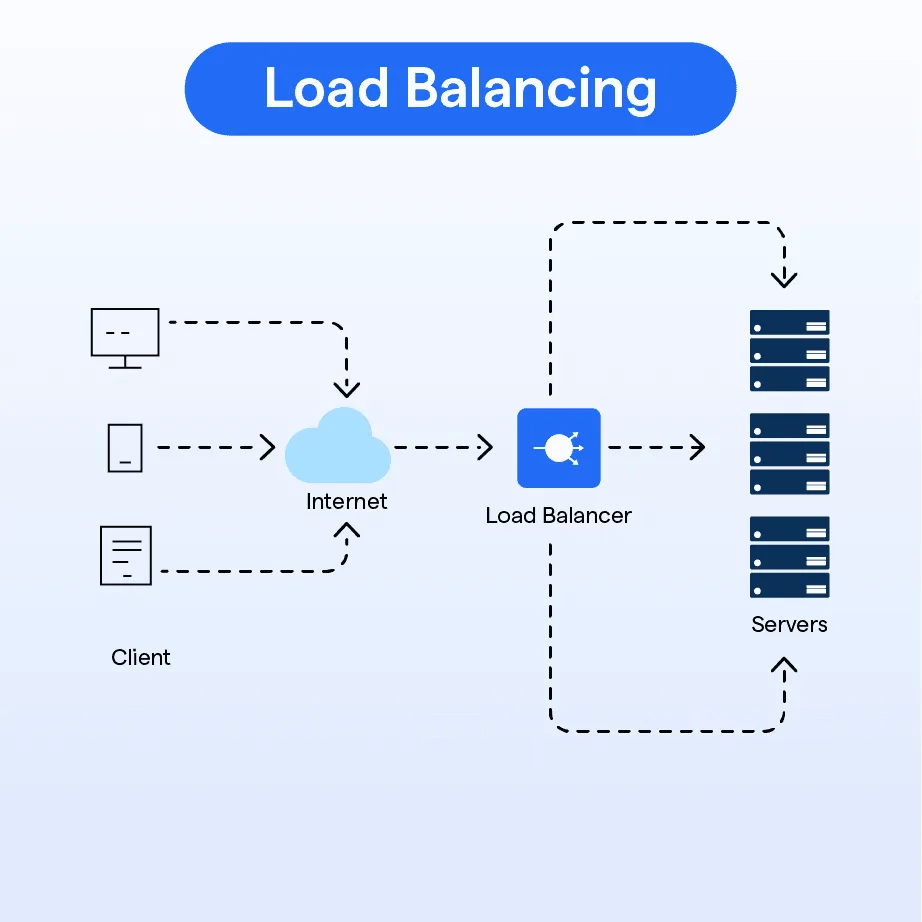
By spreading your automation across multiple connections, you reduce congestion, avoid rate limits, and create a more resilient system where failures in one connection do not affect the entire workflow.
Monitoring becomes essential at this stage, allowing you to track network performance and identify any issues before they escalate.
How to Prevent Network Issues From Coming Back
Prevention starts with understanding that network capacity is not just about speed, but about how connections are managed and distributed.
By designing your system to use multiple independent connections and avoiding excessive load on any single point, you ensure long-term stability.
Regular monitoring helps you detect anomalies and adjust your setup as needed, while continuous optimization ensures that your system remains efficient as it scales.
Common Mistakes That Make Network Problems Worse
One of the most common mistakes is assuming that higher internet speed will solve the problem, which often leads to unnecessary upgrades without addressing the underlying issue.
Another is running all automation through a single IP address, which increases the risk of rate limiting and throttling.
There is also a tendency to ignore early signs of network instability, which often indicate that the system is approaching its limit.
Real Success Stories: Before and After
A user running multiple automation workflows experienced frequent request failures and inconsistent performance, despite having a high-speed internet connection.
After restructuring their setup to distribute tasks across multiple devices using Appilot, they were able to eliminate network bottlenecks and achieve stable performance at scale.
Another example involved a team managing high-volume automation campaigns, where network limitations prevented them from scaling, but after adopting a distributed approach, they were able to handle significantly more traffic without issues.
Frequently Asked Questions
One common question is whether upgrading internet speed can fix automation issues, and while it can help in some cases, it does not address problems related to connection handling and distribution.
Another question is how many automation tasks a single connection can handle, and the answer depends on various factors, but every connection has a limit, and exceeding it will result in instability.
There is also the concern about whether distributed setups are complex, and while they require a different approach, platforms like Appilot simplify the process significantly.
Conclusion: Scale Without Network Limits
If your internet connection cannot handle more automation, it is not because your setup is failing, but because it has reached the limits of a centralized system.
Once you shift to a distributed approach, where tasks are spread across multiple connections, the bottleneck disappears, and your system becomes capable of handling significantly higher workloads.
If you are facing this issue right now, the best step forward is not to push your connection harder, but to rethink how your automation interacts with the network, because once you do, stability and scalability become the new standard.