Why Your Multi-Account Operation Feels Overwhelming
wManaging a few accounts is easy because you can still remember which profile belongs to which account, which proxy is assigned, what each login is used for, and what tasks need to be completed. The problem starts when the operation grows and you suddenly have dozens or hundreds of accounts spread across different clients, platforms, countries, campaigns, and team members.
At that point, everything starts feeling heavier. You spend more time switching between browser profiles, checking passwords, assigning proxies, finding notes, reopening lost sessions, and fixing mistakes. You start forgetting which account belongs to which client, which profiles are active, which accounts are warming up, and which team member is responsible for what.
For agencies, affiliate marketers, ecommerce teams, outreach teams, and social media managers, multi-account operations quickly become overwhelming once there is no clear structure.
The problem is usually not the number of accounts. The real problem is that the operation was never designed to scale.
Once you have clear naming systems, profile organization, status tracking, credential storage, and team rules, the workload becomes much easier to manage.
In this guide, you will learn why multi-account operations feel overwhelming, what mistakes make the problem worse, and how to build a system that stays organized even as the operation grows.
Time to improve: Usually between one and five days depending on account volume. Success rate: High if the operation becomes more structured and repeatable. Cost: Usually low compared to the amount of time and stress it prevents.
Why Multi-Account Operations Become Overwhelming
Most people start with only a few accounts, so they do not think much about structure in the beginning. They remember the passwords, they know which browser profile belongs to which account, and they know which tasks need to be completed.
The problem is that memory does not scale. Once you reach 20, 50, or 100 accounts, there are simply too many details to track manually.
You may have separate browser profiles, proxies, recovery emails, phone numbers, cookies, status updates, notes, and client details for every account. When all of that information is spread across spreadsheets, browser tabs, chat messages, folders, and bookmarks, the operation becomes much harder to manage.
Eventually, most of your time gets wasted on trying to stay organized instead of actually growing the business.
The Hidden Cost of a Disorganized Multi-Account Operation
A disorganized operation does more than waste time because it also creates expensive mistakes. A team member may log into the wrong account, an account may get flagged because the wrong proxy was assigned, a client profile may get mixed with an internal account, or a recovery email may get lost.
These mistakes become even more common when more people join the team. Without clear systems, everyone starts using different naming styles, storing information in different places, and following different processes.
The result is confusion, wasted time, duplicated work, and constant stress.
The Most Common Multi-Account Management Mistakes
One of the biggest mistakes is relying on memory. People assume they will remember which browser profile belongs to which account, but once the operation grows, that becomes impossible.
Another common issue is storing important information in too many places. Passwords may be in one spreadsheet, proxies in another, recovery emails in a chat message, and account notes in a browser bookmark folder.
Poor browser profile naming is another major problem. If profiles are called things like "Profile 5" or "Backup Test Account," nobody knows what they belong to.
Another common mistake is giving everyone access to everything. When team permissions are not controlled properly, mistakes become much more likely.
How to Make Multi-Account Operations Easier to Manage
Step 1: Create a Clear Naming System
Every browser profile, account, proxy, folder, and spreadsheet should use the same naming structure. The name should immediately tell you what the account is, what client it belongs to, what country it is assigned to, and what it is being used for. The more consistent the naming system becomes, the easier it becomes to manage large operations.
Step 2: Separate Accounts Into Groups
Do not keep every account mixed together in one long list. Separate them by client, platform, region, campaign, or internal team. This makes it much easier to find accounts quickly and reduces the chance of people using the wrong profiles.
Step 3: Centralize Credentials and Notes
Passwords, recovery emails, phone numbers, proxies, backup codes, and notes should stay in one secure system. The worst approach is spreading that information across random spreadsheets, chat messages, documents, and bookmarks.
Step 4: Track Account Status Clearly
You should always know whether an account is active, warming up, paused, restricted, banned, pending review, or assigned to someone. Without status tracking, it becomes very easy to lose track of what is happening.
Step 5: Reduce Manual Work
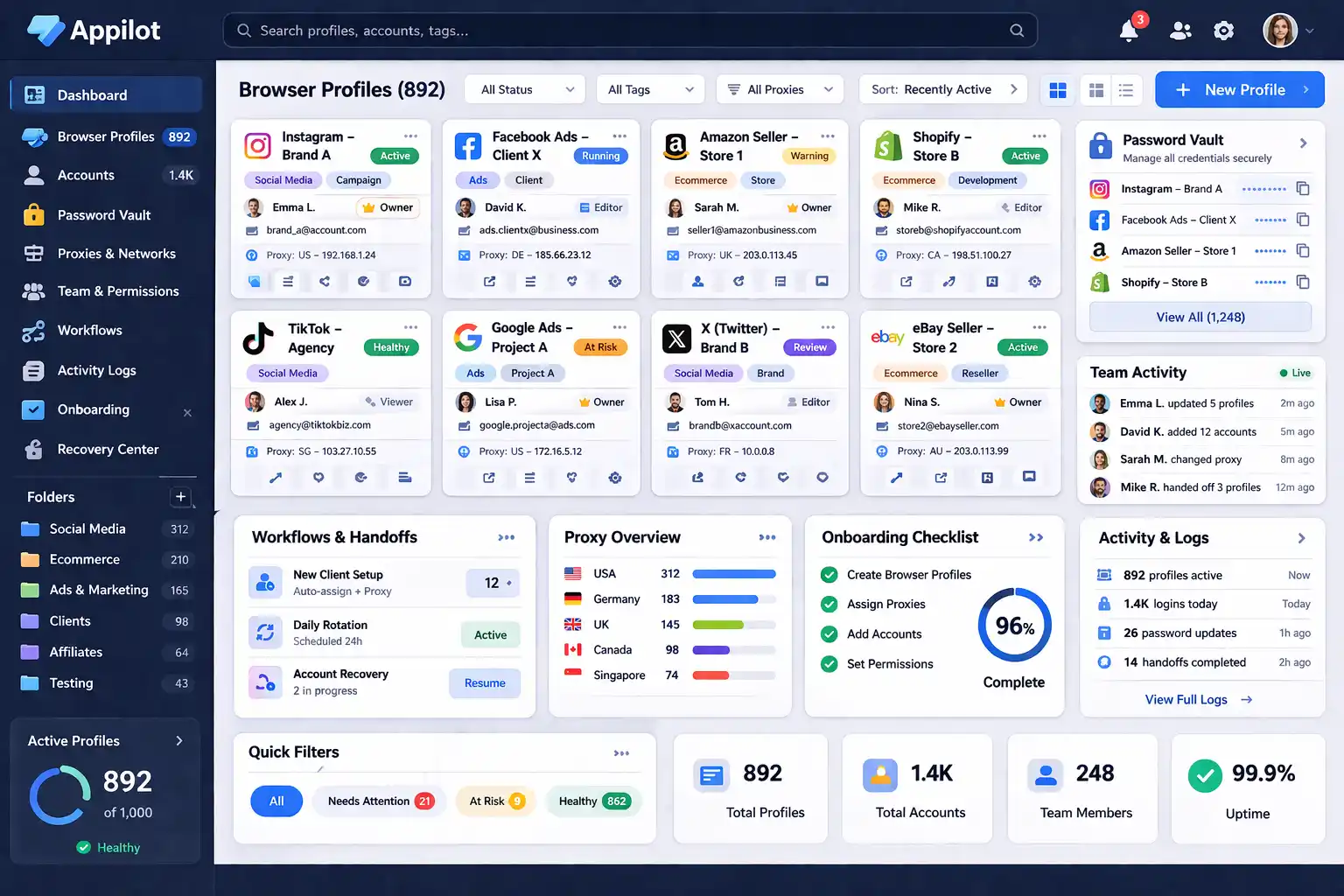
Manually opening browser profiles, checking spreadsheets, finding passwords, and switching between accounts becomes exhausting when the operation grows. Appilot can help reduce confusion by making browser profiles easier to organize, search, filter, assign, and manage across teams.
Step 6: Create Team Rules
Everyone on the team should know how browser profiles should be named, where credentials should be stored, who owns each account, and what actions are allowed. The more consistent the process becomes, the fewer mistakes people make.
How to Prevent Multi-Account Operations From Becoming Overwhelming
The best way to avoid feeling overwhelmed is building structure before the operation becomes too large. Use clear naming systems, organized browser profile folders, centralized credential storage, separate permissions, and account status tracking.
Avoid random spreadsheets, unclear profile names, shared passwords, and disorganized browser sessions. The more organized the system becomes, the easier it becomes to scale.
Common Mistakes That Make Multi-Account Operations Worse
One major mistake is waiting too long to build a system. Another mistake is letting every team member use their own naming style. People also make the mistake of storing passwords, recovery details, and proxies in too many different places.
Another common issue is failing to track account ownership and status. If the operation does not have a clear structure, it becomes very difficult to scale without becoming overwhelmed.
Frequently Asked Questions
Q1: Why do multi-account operations feel so overwhelming?
Because there are too many passwords, browser profiles, proxies, notes, and tasks to track manually.
Q2: Should every account have its own browser profile?
Yes. Separate browser profiles make accounts easier to organize and safer to manage.
Q3: What is the best way to store account credentials?
The safest approach is keeping passwords, recovery emails, and notes in one secure system.
Q4: How do you stop team members from making mistakes?
Use clear naming systems, organized folders, profile ownership rules, and separate permissions.
Q5: Does Appilot help manage large account operations?
Appilot helps make browser profile organization, team assignments, account tracking, and workflow management much easier.
Conclusion
A multi-account operation becomes overwhelming when there is no clear structure behind it. The problem is usually not the number of accounts. The problem is that everything is being managed manually.
Once you create clear naming systems, organize browser profiles properly, centralize credentials, track account status, and assign ownership, large operations become much easier to manage.
The goal is not just handling more accounts. The goal is building a system that can grow without creating more stress.